
Unveiling the Intricacies of AsyncRAT
A deployment in Colombia by the blind eagle cyber group
Unveiling the Intricacies of AsyncRAT: A deployment in Colombia by the blind eagle cyber groupIntroductionAsyncRAT is a sophisticated Remote Access Trojan (RAT)...
Introduction
AsyncRAT is a sophisticated Remote Access Trojan (RAT), intricately developed using the C# programming language. Its design is centered around an asynchronous operational framework, which grants cyber attackers’ extensive remote access and control capabilities over targeted systems. This high level of control enables the execution of a diverse array of malicious activities, including data exfiltration, system manipulation, and surveillance.
The utilization of AsyncRAT has been predominantly linked to the cyber group known as Blind Eagle, also referred to as APT-C-36. This group has been active since April 2018 and is believed to have its origins in South America. Blind Eagle’s operations are characterized by their persistent and targeted nature, focusing on high-value targets across various critical sectors. Notably, their activities have included systematic cyber-attacks against key Colombian entities, encompassing government institutions, the financial sector, the oil industry, and professional manufacturing firms.
The group’s methods exhibit advanced tactics, techniques, and procedures (TTPs), leveraging AsyncRAT’s capabilities to infiltrate and compromise systems with precision. Their approach often involves spear-phishing campaigns, exploiting software vulnerabilities, and using sophisticated social engineering techniques to gain initial access. Post-compromise, they deploy AsyncRAT to maintain persistence, conduct reconnaissance, and ultimately fulfill their malicious objectives.
Given the significant threat posed by Blind Eagle and their adept use of AsyncRAT, it’s imperative for organizations within their target spectrum to adopt robust cybersecurity measures. This includes regular system audits, employee awareness training, and the implementation of advanced threat detection and response systems.”
This includes a more in-depth exploration of AsyncRAT’s functionalities, Blind Eagle’s operational tactics, and the broader implications for cybersecurity in the targeted sectors. Blind Eagle primarily uses NjRAT, AsyncRAT, Remcos RAT, LimeRAT, and QuasarRAT in its campaigns. Blind Eagle’s modus operandi has remained the same since its emergence, which indicates that it is comfortable conducting spear-phishing campaigns as they continue to hit the target.
Capabilities
· AsyncRAT creates files inside the user directory
· AsyncRAT creates and modifies system processes
· AsyncRAT creates persistence using scheduled task (if-admin)
· AsyncRAT creates persistence using registry (if non-admin)
· AsyncRAT utilizes the defense evasion technique Masquerading
· AsyncRAT utilizes the Virtualization/Sandboxes evasion techniques.
· AsyncRAT utilized the anti-analysis and anti-debugging techniques.
· AsyncRAT encrypts the configuration file using AES-256.
· AsyncRAT uses the process manipulation techniques to evade defense.
· AsyncRAT uses Command and control (C2) server to exfiltrate and install plugins.
Technical Details and Chain flow
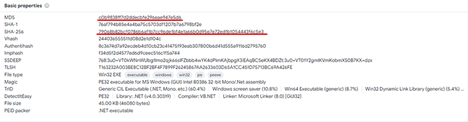
File Info:
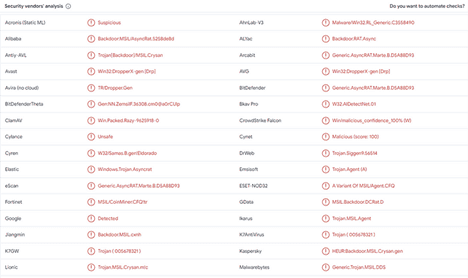
AsyncRAT is also known by security vendors as following:
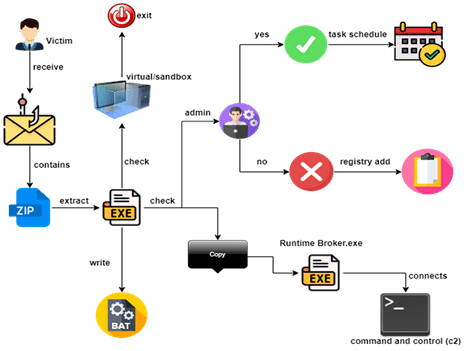
Flow of attack and execution:
Investigations reveal that the initial phase of Blind Eagle APT’s phishing campaign involves the dissemination of a deceptive email. This email features a subject line in Spanish and contains an attachment: a password-protected PDF. The PDF is designed to entice recipients with a seemingly urgent request to view an allegedly pending tax document. Upon opening the PDF, users are confronted with a URL that closely mimics the official site of the Directorate of National Taxes and Customs. However, this link is fraudulent. When clicked, it redirects the user to an alternative website. This site is responsible for deploying a secondary payload, discreetly retrieved from a public Discord server. This secondary payload serves as a precursor to the final stage of the cyber-attack. It facilitates the installation of AsyncRAT, completing the infection process. The sophisticated nature of this method underscores the necessity for vigilance and robust cybersecurity measures, particularly in recognizing and responding to phishing attempts. In this report, I got a sample which is downloaded by clicking on phishing link and I try to perform technical analysis of the sample and extracted the TTP’s utilized by blind eagle threat group.
Tools and Environment
· Flare-VM (Windows 10)
· REMnux (Simulator)
· dnSpy
· Cutter
· Detect-it-easy
· RegShot
· ExeInfoPE
· De4dot
· Capa
· Procmon
· Process Hacker
· TcpView
· PE Bear
· PE Studio
· Wireshark
Stage (async.exe)
Basic and Advanced Static Analysis
Basic Information
async.exe:
SHA256: 79068b82bcf0786b6af1b7cc96de1bf4e1a66b0d95e7e72ed1b1054443f6c5e3
MD5: c0b9838ff7d2ddecbfe296eae947e5d6
CPU: 32-bits
Language: .Net programming language (c#)
Compiler-stamp: Sun May 10 05:24:51 2020 UTC
Interesting Strings:
• /c schtasks /create /f /sc onlogon /rl highest /tn
• Select * from AntivirusProduct, Select * from Win32_ComputerSystem
•CfXpd10bbWOrMPUDu4xOQVkVoERQrspS5I5RrSBc3XPr6/l12WdhfLjn9IUpy8mtbVoZq8Nl2UitCoQT8mAlLQ==
•5xU2z25Rov7slOLBtk+8+vn4pnps2wv04q8onR2M1PeHt+fevvgEpJ9uqUq8M6BdaI5lNbuF3jAHGdE7FovjtQ==
• "" /tr '""' & exit\nuR\noisreVtnerruC\swodniW\tfosorciM\erawtfoS
• \nuR\noisreVtnerruC\swodniW\tfosorciM\erawtfoS
• Inspection keywords: LoadModule, MemoryStream, ToBase64String, FileAccess, RSACryptoServiceProvider, RtlSetProcessIsCritical
Packing
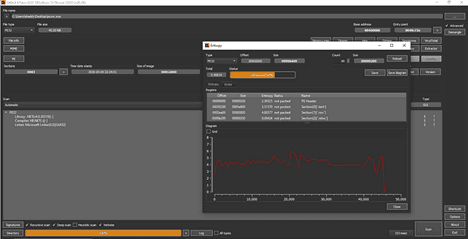
Detect-It-Easy
After opening the sample with detect-it-easy tool it shows me that the binary is not packed but there was at some level I assumed it may be little bit obfuscated and there will be some random strings and junk data to make it difficult for analysts.
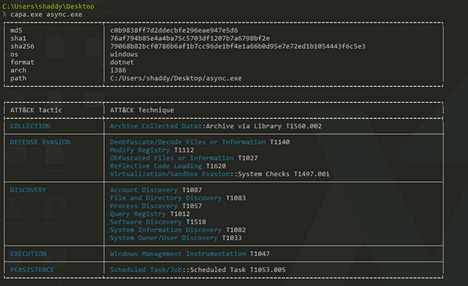
Capa-Output
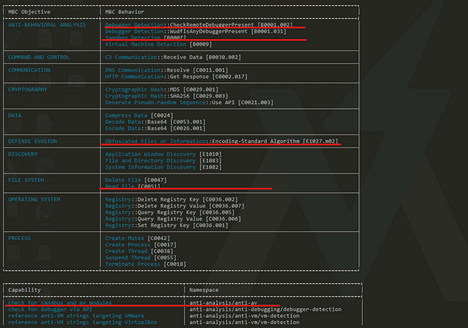
When I performed CAPA analysis on first stage of malware (WinDir.exe), it indicates that the binary is not packed. The detailed verbose analysis also tells the binary is obfuscated and it triggers most of the rules which indicated that the binary is using these tactics and techniques according to MITRE ATT&CK framework. The CAPA analysis also indicates that the binary is performing system discovery, file discovery and defense evasion like obfuscation and masquerading files. Capa output also indicates that the sample has Anti-VM and Anti-Behavioral analysis techniques to make malware analysis harder for analysts. Capa output triggers multiple TTPs that are utilized by the malware, at this point I am not sure about these TTPs. After performing behavioral and dynamic analysis I can say about the actual behavior of the malware.
Static Analysis
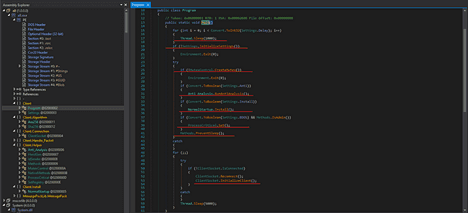
Before performing dynamic analysis and first detonation of malware, I opened the malware in dnSpy-x86 to perform some advanced static analysis. Because the binary is .NET and it was not packed by any custom or commercial packer, so I got the clear code by using the Decompiler and debugger. Before debugging the code line by line and performing dynamic analysis I started looking into functions and trying to understand the working of the malware. Before wasting anytime, I just go to the entry point which was main function and at the very first line there was “for” loop which is running 4 times from 0–3 and each time sleep for 1 sec. In short it was sleeping 4000 milliseconds before executing anything. This technique could be leveraged by threat actors to bypass defense mechanisms.

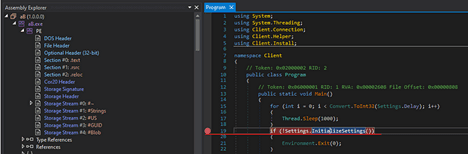
After the loop there was a “if” condition which was checking the function return value. If the function InitializeSettings() is returning true then it performs rest of the working, if the Boolean value is false, it is exiting the program here.

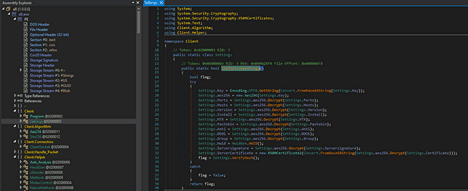
When I opened the function to check what actually this function is doing, I found AsyncRAT configurations. These configurations contain ports, hosts, versions, installation, MTX, certificates and also other stuff which were encrypted with AES-256. At this stage, I don’t know the values of these configurations.
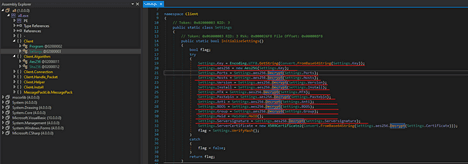
Next step it was created the MUTEX and at this stage I don’t know what value it was using because the MUTEX value was encrypted with AES-256.
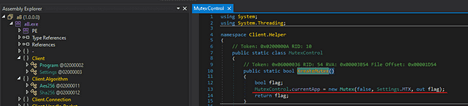
If the MUTEX is created successfully then it executes next instructions otherwise it exited the program. The next instructions were performing anti-analysis, anti-debugging and anti-sandboxing techniques. These techniques I will show you in my advance analysis and how to bypass these checks to continue the analysis.

After the above-mentioned checks the malware was installing itself and doing the stuff. If the above all checks return true, then it was performing installation and some persistence techniques.

After installing and performing some persistence, it was checking if the malware is executing with admin privileges, and the value of a public static variable (BDOS) is true then I was making itself as a critical process by utilizing the native API calls from ntdll.dll. I already analyzed a lot of malwares which used this technique to evade AV/EDR because only limited windows legitimate process is running as critical processes and by terminating those processes you will get BSOD (Blue screen of death). Maybe the variable is indicating the same name, but threat actors misspelled it.

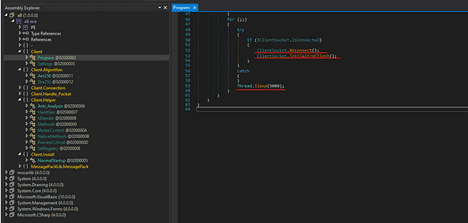
In the last step of my static analysis there was loop designed to maintain a network connection in a client-server model. Here’s a breakdown of its functionality:
for (;;):— This is an infinite loop. It will continue to run until the program is manually stopped or an external condition causes it to exit.
try— This block is used to handle any exceptions that might occur during the execution of the code inside it. This is a common practice to ensure the program doesn’t crash unexpectedly.
if (!ClientSocket.IsConnected)— This condition checks if the client socket is not connected.
ClientSocket.Reconnect(); — If the client socket is not connected, this line attempts to reconnect the client to the server.
ClientSocket.InitializeClient(); — This method likely initializes the client socket, setting up necessary parameters or configurations for the connection.
Thread.Sleep(5000); — This line pauses the execution of the current thread for 5000 milliseconds (or 5 seconds). It’s likely used here to prevent the loop from overwhelming the CPU or network with continuous connection attempts.
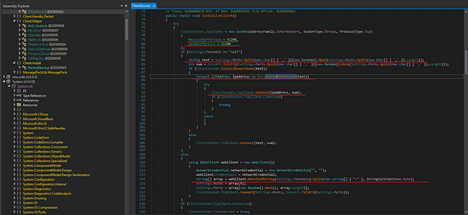
This code snippet is a more detailed implementation of a method called InitializeClient() in a client-server networking context. The method is structured to establish a TCP connection with a server, potentially involving secure communication over SSL/TLS. Here’s a breakdown:
Socket Initialization: A TCP socket is created with specified buffer sizes for sending and receiving data. The SocketType.Stream and ProtocolType.Tcp indicate it’s a TCP socket, suitable for continuous streams of data.
Server Connection Logic: The method includes logic for choosing server addresses and ports. If Settings.Pastebin is set to “null”, it randomly selects a server address and port from a list defined in Settings.Hosts and Settings.Ports. If Settings.Pastebin is not null, it fetches a server address and port from a Pastebin URL.
Domain Name Validation: The code checks if the chosen server address is a valid domain name. If it is, it resolves the domain name to an IP address and attempts to connect to it. If not, it directly attempts to connect to the address provided.
Catch Blocks: There are several empty catch blocks which are not handling exceptions. This could lead to silent failures where errors are not logged or addressed.
SSL/TLS Setup: If the connection is successful, it sets up an SSL/TLS stream for secure communication, authenticating the server’s certificate. The specifics of the SSL/TLS protocol version and other parameters are configured here.
Data Transmission Setup: The client prepares to send and receive data. This includes setting up data buffers, initiating a keep-alive packet mechanism, and starting a timer for sending pings.
Read Server Data: The client begins asynchronously reading data from the server, using the BeginRead method on the SSL stream.
Connection Status: The client’s connection status (IsConnected) is updated based on whether the connection is successfully established or not.
Basic Dynamic Analysis
Procmon and Process Hacker
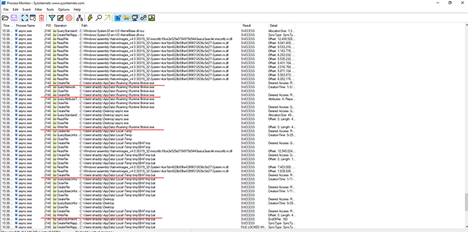
As an offensive security researcher, I always prefer Procmon, process hacker, TcpView and Wireshark in my first detonation of malware sample which I analyze. When I executed the sample and captured all traffic using Wireshark, captured the whole host-based activities using Procmon and network connections using TcpView, I noticed some interesting activities on Procmon. I applied filter on Procmon to check either AsyncRAT write any file or download any file on disk at runtime. I noticed that the sample wrote two file one with the name of “Runtime Broker” in %APPDATA% and secondly it created batch file with the name of “tmp8BAF.tmp.bat” in temp folder. When I checked registry changes, I noticed that the malware was setting registry value with the same name as EXE which it created in %APPDATA%. This registry key is used to create persistence on system, so at this point I was sure that the malware is creating persistence by adding the Runtime Broker.exe in the registry path HKCU\SOFTWARE\Microsoft\Windows\CurrentVersion\Run\Runtime Broker
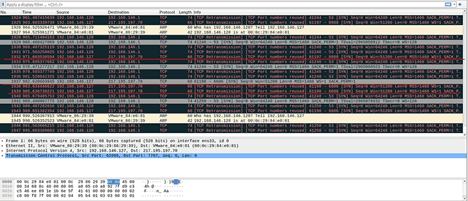
I noticed some connection request over TCP, at this stage I can say the malware maybe was trying to connect with this IP address 217.195.197.70 using different port like 6606, 8808 and 7707. The malware was trying to create sockets.
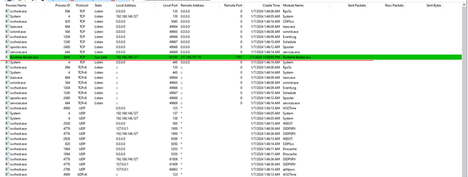
To make sure network activity and which process is responsible for making connection on above mentioned IP address, I checked all processes network activities by using one of my favorite tools TcpView. I noticed that the process with the same name Runtime Broker.exe was trying to connect with the same IP address over TCP on same ports that I have mentioned above. This was continuously sending the sync packets to initiate the TCP connection. At that point, I was sure that this process was responsible for the rest of the malware activities and connecting with the command-and-control server.
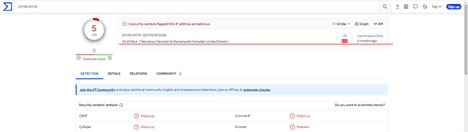
After my first detonation of sample, I have some idea about the malware that it was creating two files, one is batch file and the other was .exe file. Also, it was adding some registry value for persistence and trying to create TCP connection with command-and-control server on different Ports. When I checked this IP on virus total most of the vendors was indicating it as a malicious IP address and virus total was showing me the IP is from Turkey according to the ASN.
When I checked the process tree, I noticed that the process was executing cmd.exe, timeout.exe and the same file Runtime Broker.exe in its child hierarchy. At that point I don’t know what full working and code structure of Runtime Broker.exe is and who is responsible for running other processes. It will be clearer to me after performing debugging and advanced dynamic analysis of the malware.

Advanced Dynamic Analysis
Run as Admin
I started advanced dynamic analysis of samples using dnSpy-x86. Dnspy is one of the best debuggers and Decompiler for .NET binaries. AsyncRAT.exe is .NET binary so I open it using dnSpy, In my static analysis, I noticed that the program was looking admin privileges also so I decided to breakdown my analysis into two parts first one to run as a admin and check all the behavior and the second run as normal privileges and check what is the different and how the malware is behaving in both conditions. The flow of the entry was same as I mentioned in my static analysis. First creating some sleep, then initializing its configuration, creating mutex, checking virtualized environment, installing the process as critical and at the end continuously trying to connect with the server. So let start debugging set breakpoint on each step and try to decrypt the configuration and see the behavior of malware.
Breakpoints
I start analysis step by step and putting breakpoints. First, I wanted to know about the configurations file that it was initializing and checking if everything is good then go to next step. So, I put breakpoint on if condition where it was checking whether the function is returning true or false.
Following the execution flow I step-into this function and there were configurations at this point all were encrypted with AES-256. So, I put breakpoints on decryption function which was returning decrypted values of all configurations and executing the flow and extracting the decrypted value, let’s check one by one what was the actual configuration.
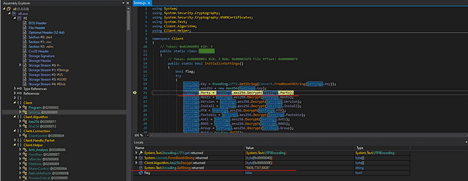
After successfully starting the program, I decrypted value one by one so I can clearly understand the working of the malware. When I decrypted the Ports on which the malware was trying to communicate with the C2 server over TCP, these ports were same that we analyzed in our first detonation.
When I followed the execution, I found that it was trying to connect with the same IP address that we found in TcpView. It means the malware hardcoded the c2 server IP and ports but in encrypted form to which it was trying to create socket.
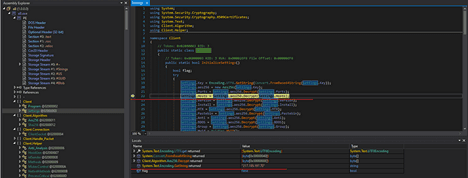
After decrypting the next value, which was some variable with name version, it decrypted the version value. Maybe this value is used while creating connection with the C2 server.
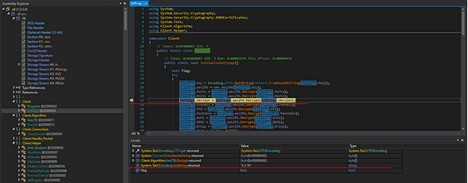
When I decrypted the next variable with the name install which was using into function of malware installation. This was retuning Boolean value “true” after decrypting. When malware initializes its configurations by default the declared value of this variable is true.
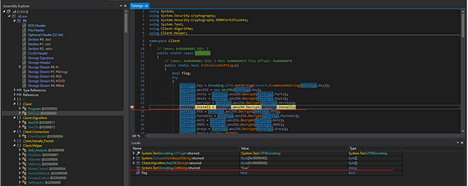
Now I have decrypted the next value of configuration which was used to create MUTEX. Malware uses mutex for different purposes, for example synchronization of instances, or if the same instance is already running or run the close the program etc. The sample was creating the mutex with the value of AsyncMutex_6SI8OkPnk.
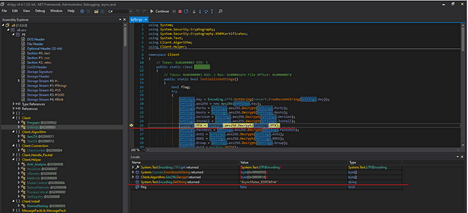
After that there was a variable with the name Pastebin which was returning the null after decrypting. Maybe this was something that was filled when the connection was established.
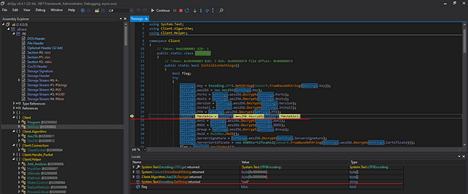
The next value was for anti-vm and anti-sandbox. After decrypting the value, it was returning the Boolean “false”. I was surprised at this point. Maybe this value should be true by default to check virtualization or sandboxes. I have to make this value false anyway to perform my analysis, this step is called patching the malware.
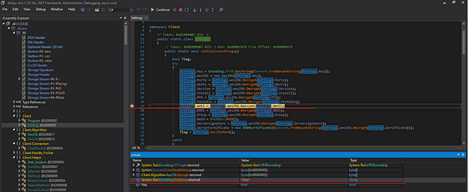
After that there was a BDOS variable after decrypting it was returning the value false by default. This is something which was used to make a process critical. Maybe all these values will be true in other .exe which this malware was creating with the name of Runtime Broker.exe.
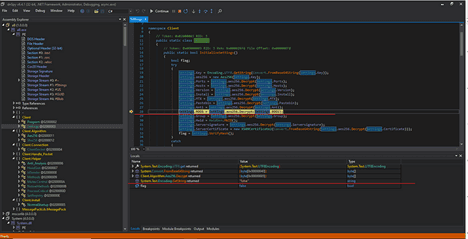
At the end, there were variables with the name of Serversignature and ServerCertificate. After decrypting value, I got the certificate which was used to connect with the c2 server over TLS/SSL. All data was sent and receiving over encrypted form. I am attaching both screenshots so you guys can see the certificate and signatures values which were used during the connection creation.
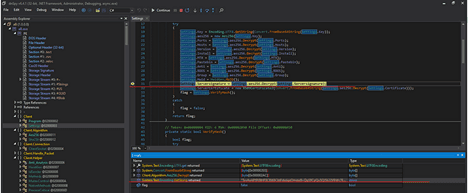
At the end of this function, there was a verifyHash() function which was checking the integrity of certificates and signatures of server before returning true or false. If the certificate value is same, then it returns true.
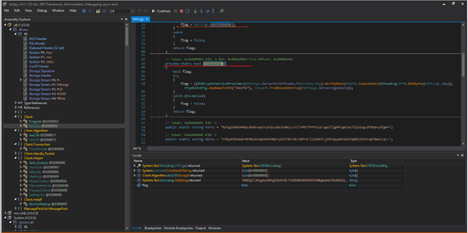
After completing the initialization function, I forwarded to the next instruction there was if statement which was checking whether the mutex is successfully created or not. If the mutex is not created it stops the execution of program. So, I set the breakpoint of CreateMutex() function and see the returning value to continue the flow of program execution.
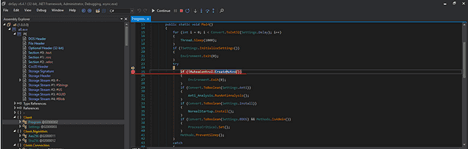

After successfully creating the mutex with value that I mentioned in my above analysis the program now checking and executing RunAntiAnalysis() which was checking different checks either the malware is running in virtual or sandbox environment then it will exit. Let check the each anti-vm and anti-sandbox techniques deployed by this malware sample.

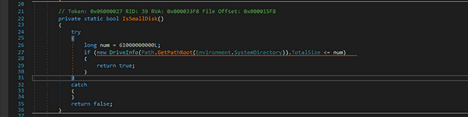
In this function there were 5 functions executing. All these functions are checking different conditions and returning the value of true or false based on the environment in which the malware was running. Let’s discuss the conditions one by one.

C# method named IsSmallDisk that checks if the system drive has a total size less than or equal to 61,000,000,000 bytes (approximately 61 GB).
Defining Size Limit: long num = 61000000000L; sets the size limit (61 GB) for what is considered a ‘small disk’.
Getting System Drive Size:
◦ Path.GetPathRoot(Environment.SystemDirectory) gets the root path of the system directory (usually the drive where the operating system is installed).
◦ new DriveInfo(...).TotalSize creates a DriveInfo object for the system drive and retrieves its total size.
Size Comparison:
◦ if (new DriveInfo(Path.GetPathRoot(Environment.SystemDirectory)).TotalSize <= num) checks if the total size of the system drive is less than or equal to 61 GB.
◦ If the condition is true, return true; is executed, indicating that the disk is considered 'small'.
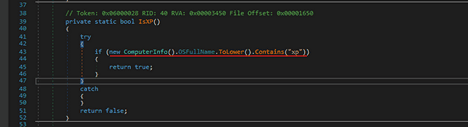
IsXP method that checks if the operating system of the computer is Windows XP
• Checking operating system:
◦ new ComputerInfo().OSFullName.ToLower() creates an instance of ComputerInfo and retrieves the full name of the operating system, converting it to lowercase.
◦ .Contains("xp") checks if the OS name contains the substring "xp".
• Returning true for Windows XP:
◦ If the condition if (new ComputerInfo().OSFullName.ToLower().Contains("xp")) is true, which means the operating system name includes "xp", the method returns true. This indicates that the operating system is Windows XP.
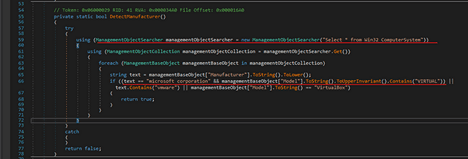
After that DetectManufacturer method intended to determine if the computer is a virtual machine based on its manufacturer and model.
• Using statements for resource management:
◦ ManagementObjectSearcher is instantiated with the query "Select * from Win32_ComputerSystem". This object queries WMI (Windows Management Instrumentation) for information about the computer system.
• Retrieving query results:
◦ ManagementObjectCollection is obtained from the ManagementObjectSearcher object. It contains the results of the WMI query.
• Iterating over management objects:
◦ The method iterates over each ManagementBaseObject in the ManagementObjectCollection. It retrieves and converts the Manufacturer property to lowercase and stores it in the text variable. The Model property is also retrieved for further checks.
• Checking for virtual machine manufacturers:
◦ The method checks if the manufacturer is "Microsoft Corporation" and the model contains "VIRTUAL", indicating a Microsoft virtual machine (like Hyper-V).
◦ It also checks if the manufacturer's name contains "vmware" or if the model is "VirtualBox". If any of these conditions are met, the method returns true, indicating the system is likely a virtual machine.
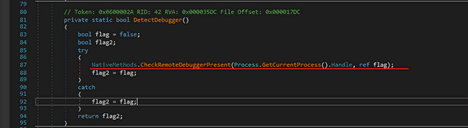
The DetectDebugger method is designed to check if the current process is being debugged. NativeMethods.CheckRemoteDebuggerPresent(Process.GetCurrentProcess().Handle, ref flag); is called. This method is presumably a part of a custom class NativeMethods and is expected to perform a check to see if the current process (Process.GetCurrentProcess().Handle) is being debugged. The result of this check is stored in flag. After the call, flag2 is set to the value of flag. If the CheckRemoteDebuggerPresent method determines that the process is being debugged, flagwill be true, and thus flag2 will also be set to true.
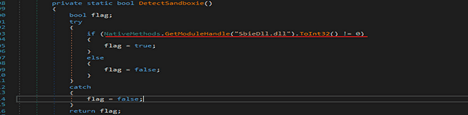
And in the final the DetectSandboxie method is designed to detect whether the application is running within Sandboxie, a popular sandboxing software. NativeMethods.GetModuleHandle("SbieDll.dll").ToInt32() is called to get a handle to the module SbieDll.dll, which is a known component of Sandboxie. .ToInt32() != 0 checks whether the handle is non-zero. A non-zero value indicates that the module is present in the process’s address space, suggesting that the application is running within Sandboxie. If the module is found, flag is set to true. Otherwise, it is set to be false.
After that there was a condition that was checking if the install variable is true then it was calling the function with the name “Install()”. I decided to debug this function step by step because this was the core function who was responsible for creating persistence and to perform other steps.

The above all mentioned checks was to initialize the configuration files and to check if the malware running in virtualized environment or not. If everything is ok, then this function is responsible for installing the malware. In the function firstly it was getting the fileInfo which was the same path in which the malware was creating the “Runtime Broker.exe” and also getting the name of current running process.
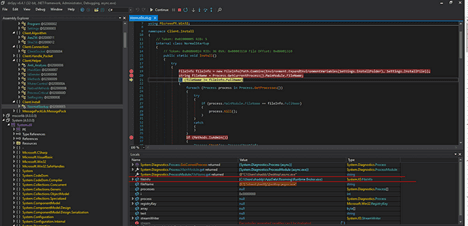
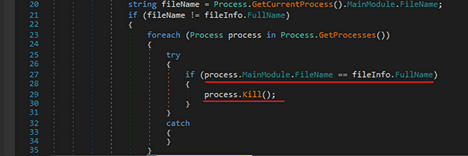
After getting these two it was checking if both the running process and the file name in the APPDATA is same then it tries to kill the running program and exit the code.
After that it checked if the program is running with admin privileges, then it started process and scheduled a task with highest privileges to create persistence.
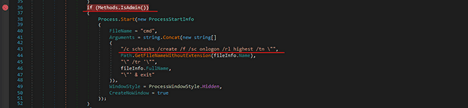
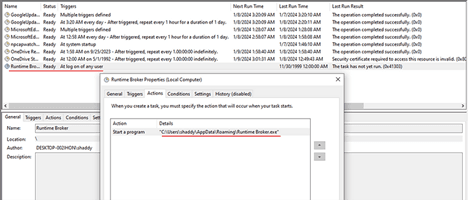
After executing the instruction when I checked the task schedule and see there was a task with the name of Runtime Broker was created with highest privileges and executed Runtime Broker.exe from APPDATA every time user login. So, this was creating the persistence using task scheduled if the program executes with the admin privileges.
If the program is executed with normal privileges, then the malware was using the registry key to create persistence rather them scheduling the task. So, in the execution flow these are two different persistence techniques depending on the privileges. “HKCU\Software\Microsoft\Windows\CurrentVersion\Run”

The string value was in reverse form and there was a function which was taking the registry value as an input and setting it in actual form. These techniques are used by threat actors to bypass defense mechanisms. After that the malware was getting the bytes from the running file and writing the same bytes using name “Runtime Broker.exe” in APPDATA folder. Which means it was copying itself in APPDATA.
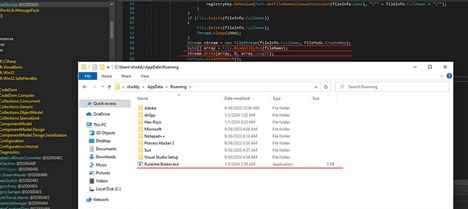
After that there was some instructuon which was created a batch file in temp folder. This batch script was executing command timeout 3 > null and starting the copied file “Runtime Broker.exe” also destroying itself after doing all stuff.

After executing the instructions, we can clearly see that it created a batch file in temp folder with the name of “tmpB21A.tmp.bat” and writing some commands in this batch file.
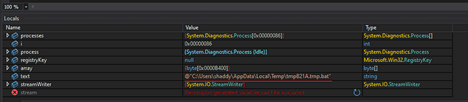
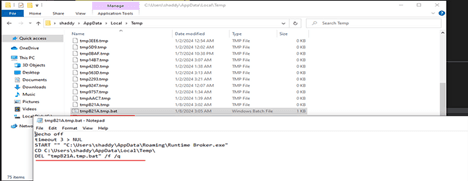
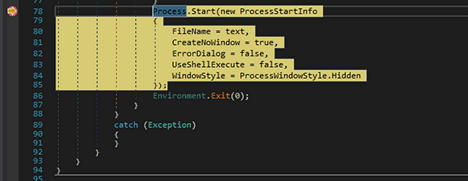
After that it started the process and executing the batch file. The batch file was the executing Runtime Broker which was doing other stuff. After that this program was exiting itself.
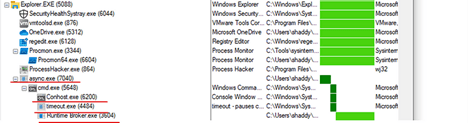
This is the process tree when executing with admin privileges. The difference is that with the admin privileges it executes task schedule to create persistence but in normal it executes CMD to create registry key.

Runtime Broker.exe
Now I decided to analyze the copied file, maybe there will be something different in this binary of any loaded modules. So, I opened this binary in dnSpy-x86 and started my analysis on it. But this was the same exe, but this time was totally responsible for creating sockets on the above-mentioned IP address and trying to download and load new plugins for further activities. In the loop it was continuously trying to check the connect request. InitializeClient() method was doing two main steps one it was checking if the Pastebin variable is null then it was getting the IP and ports and trying to create socket over TCP.
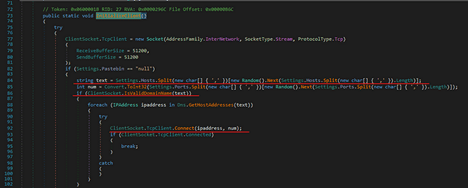
The next step was using web client class to download and upload data on created connect server, but it was also checking the certificates and signature for integrity checks.
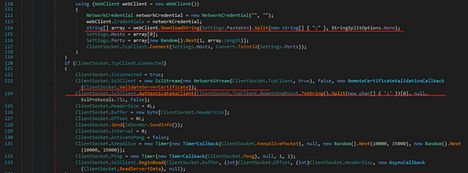
Because the server is offline so I can’t get the other loaded modules, so I have to stop my analysis here. But this was a pretty much analysis to understand the working and flow of AsyncRAT which targeting Colombian government entities.
Loaded .NET Assemblies
CLR v4.0.30319.0, 8, CONCURRENT_GC, ManagedExe, C:\Users\shaddy\AppData\Roaming\Runtime Broker.exe,
AppDomain: Runtime Broker.exe, ID: 19897800, Type: Default, Role: Executable , aB, ID: 20068920, C:\Users\shaddy\AppData\Roaming\Runtime Broker.exe,
Microsoft.VisualBasic, ID: 87782856
▪C:\Windows\Microsoft.Net\assembly\GAC_MSIL\Microsoft.VisualBasic\v4.0_10.0.0.0__b03f5f7f11d50a3a\Microsoft.VisualBasic.dll
◦ System, ID: 20081984, Type: Native
▪C:\Windows\Microsoft.Net\assembly\GAC_MSIL\System\v4.0_4.0.0.0__b77a5c561934e089\System.dll
▪C:\Windows\assembly\NativeImages_v4.0.30319_32\System\4ce1bb4828b69fa433f6f012636c5d27\System.ni.dll
◦ System.Configuration, ID: 87806360, Type: Native
▪C:\Windows\Microsoft.Net\assembly\GAC_MSIL\System.Configuration\v4.0_4.0.0.0__b03f5f7f11d50a3a\System.Configuration.dll
▪C:\Windows\assembly\NativeImages_v4.0.30319_32\System.Configuration\7f3b1084571309437a152226b37b6f28\System.Configuration.ni.dll
◦ System.Core, ID: 88645400, Type: Native
▪C:\Windows\Microsoft.Net\assembly\GAC_MSIL\System.Core\v4.0_4.0.0.0__b77a5c561934e089\System.Core.dll
▪C:\Windows\assembly\NativeImages_v4.0.30319_32\System.Core\617d43135fd67b6370a09fbe5fb2e5f7\System.Core.ni.dll
◦ System.Xml, ID: 87803728, Type: Native
▪C:\Windows\Microsoft.Net\assembly\GAC_MSIL\System.Xml\v4.0_4.0.0.0__b77a5c561934e089\System.Xml.dll
▪C:\Windows\assembly\NativeImages_v4.0.30319_32\System.Xml\be1f06a790a86342db4dbd229ca727a3\System.Xml.ni.dll
AppDomain: SharedDomain, ID: 1939592416, Type: Shared
• mscorlib, ID: 20027728, Type: DomainNeutral, Native
◦C:\Windows\Microsoft.Net\assembly\GAC_32\mscorlib\v4.0_4.0.0.0__b77a5c561934e089\mscorlib.dll
C:\Windows\assembly\NativeImages_v4.0.30319_32\mscorlib\f6ce2e529a5784970d9443aaca3aac4e\mscorlib.ni.dll
Loaded Modules
Runtime Broker.exe — 72 kB, Base Address: 0xbe0000
• advapi32.dll — 492 kB, Advanced Windows 32 Base API, Base: 0x75bf0000
• apphelp.dll — 640 kB, Application Compatibility Client Library, Base: 0x74430000
• bcrypt.dll — 100 kB, Windows Cryptographic Primitives Library (Wow64), Base: 0x77ce0000
• bcryptprimitives.dll — 380 kB, Windows Cryptographic Primitives Library, Base: 0x76d60000
• clr.dll — 7.73 MB, Microsoft .NET Runtime CLR — WorkStation, Base: 0x73270000
• clrjit.dll — 504 kB, Microsoft .NET Runtime Just-In-Time Compiler, Base: 0x74140000
• combase.dll — 2.5 MB, Microsoft COM for Windows, Base: 0x76dc0000
• crypt32.dll — 1 MB, Crypto API32, Base: 0x77660000
• crypt32.dll.mui — 40 kB, Crypto API32, Base: 0x2e10000
• cryptbase.dll — 40 kB, Base cryptographic API DLL, Base: 0x74710000
• cryptsp.dll — 76 kB, Cryptographic Service Provider API, Base: 0x75170000
• gdi32.dll — 144 kB, GDI Client DLL, Base: 0x777c0000
• gdi32full.dll — 928 kB, GDI Client DLL, Base: 0x760a0000
• imm32.dll — 148 kB, IMM32 API Client DLL, Base: 0x77d00000
• kernel.appcore.dll — 60 kB, AppModel API Host, Base: 0x75140000
• kernel32.dll — 960 kB, NT BASE API Client DLL, Base: 0x77910000
• KernelBase.dll — 2.23 MB, NT BASE API Client DLL, Base: 0x771b0000
• KernelBase.dll.mui — 1.25 MB, NT BASE API Client DLL, Base: 0x55f0000
• locale.nls — 804 kB, Base: 0xfc0000
• Microsoft.VisualBasic.dll — 624 kB, Visual Basic Runtime Library, Base: 0x5550000
• msasn1.dll — 56 kB, ASN.1 Runtime APIs, Base: 0x74700000
• mscoree.dll — 328 kB, .NET Runtime Execution Engine, Base: 0x743c0000
• mscoreei.dll — 544 kB, .NET Runtime Execution Engine, Base: 0x74330000
• mscorlib.ni.dll — 20.3 MB, .NET Class Library, Base: 0x71e20000
• msvcp_win.dll — 492 kB, C Runtime Library, Base: 0x76ce0000
• msvcrt.dll — 764 kB, Windows NT CRT DLL, Base: 0x75e40000
• mswsock.dll — 328 kB, Windows Sockets Provider, Base: 0x70a80000
• ntdll.dll — 1.64 MB, NT Layer DLL, Base: 0x77d50000
• ntdll.dll — 1.97 MB, NT Layer DLL, Base: 0x7fff327f0000
• ole32.dll — 908 kB, Microsoft OLE, Base: 0x75d50000
• oleaut32.dll — 600 kB, OLEAUT32.DLL, Base: 0x77a40000
• profapi.dll — 112 kB, User Profile Basic API, Base: 0x75150000
• psapi.dll — 24 kB, Process Status Helper, Base: 0x75f00000
• rpcrt4.dll — 764 kB, RPC Runtime, Base: 0x75c70000
• rsaenh.dll — 188 kB, Enhanced Cryptographic Provider, Base: 0x71b80000
• sechost.dll — 472 kB, SCM/SDDL/LSA Host APIs, Base: 0x775e0000
• SHCore.dll — 540 kB, SHCORE, Base: 0x770c0000
• shell32.dll — 5.71 MB, Windows Shell Common DLL, Base: 0x76720000
• shlwapi.dll — 276 kB, Shell Light-weight Utility Library, Base: 0x76190000
• SortDefault.nls — 3.22 MB, Base: 0x5070000
• sspicli.dll — 132 kB, Security Support Provider Interface, Base: 0x75090000
• System.Configuration.ni.dll — 1.02 MB, .NET Framework, Base: 0x73ef0000
• System.Core.ni.dll — 8.09 MB, .NET Framework, Base: 0x68810000
• System.ni.dll — 10.11 MB, .NET Framework, Base: 0x71160000
• System.Xml.ni.dll — 7.42 MB, .NET Framework, Base: 0x680a0000
• ucrtbase.dll — 1.13 MB, C Runtime Library, Base: 0x777f0000
• ucrtbase_clr0400.dll — 716 kB, C Runtime Library, Base: 0x74250000
• user32.dll — 1.61 MB, USER API Client DLL, Base: 0x773f0000
• vcruntime140_clr0400.dll — 84 kB, C Runtime Library, Base: 0x74310000
• version.dll — 32 kB, Version Info Library, Base: 0x75350000
• win32u.dll — 96 kB, Win32u, Base: 0x75d30000
• windows.storage.dll — 6.07 MB, WinRT Storage API, Base: 0x755d0000
• wldp.dll — 148 kB, Windows Lockdown Policy, Base: 0x755a0000
• wow64.dll — 356 kB, Win32 Emulation on NT64, Base: 0x7fff31ca0000
• wow64cpu.dll — 40 kB, AMD64 Wow64 CPU, Base: 0x77d40000
• wow64win.dll — 524 kB, Wow64 Console/Win32 API Logging, Base: 0x7fff316e0000
• ws2_32.dll — 396 kB, Windows Socket 2.0 32-Bit DLL, Base: 0x77ae0000
Extracted TTP’s
MITRE ATT&CK MAPPING
Technique
Kill chain phase
Diamond vertex
Comments
T1566.001 — Phishing: Spearphishing Attachment
Delivery
Capability
Email with ZIP file attached
T1547.001 — Boot or Logon AutoStart Execution: Registry Run Keys / Startup Folder
Installation
Capability
Set registry key if non-privileged user executes the payload
T1053.005 — Scheduled Task/Job: Scheduled Task
Installation
Capability
Creates new scheduled task if privileged user executes the payload
T1543 — Create or Modify System Process
Installation
Capability
Create Mutex to check another instance is running.
T1036.S004 — Masquerading: Masquerade Task or Service
Installation
Capability
Set the process critical to evade detection
T1036.005 — Masquerading: Match Legitimate Name or Location
Execution
Capability
Writes itself as a file named Runtime Broker.exe saved in %APPDATA%
T1059.003 — Command and Scripting Interpreter: Windows Command Shell
Execution
Capability
Executes batch file created previously
T1497.001 — Virtualization/Sandbox Evasion: System Checks
Execution
Capability
Anti-VM and Sandboxes checks
Recreation and Security controls validation
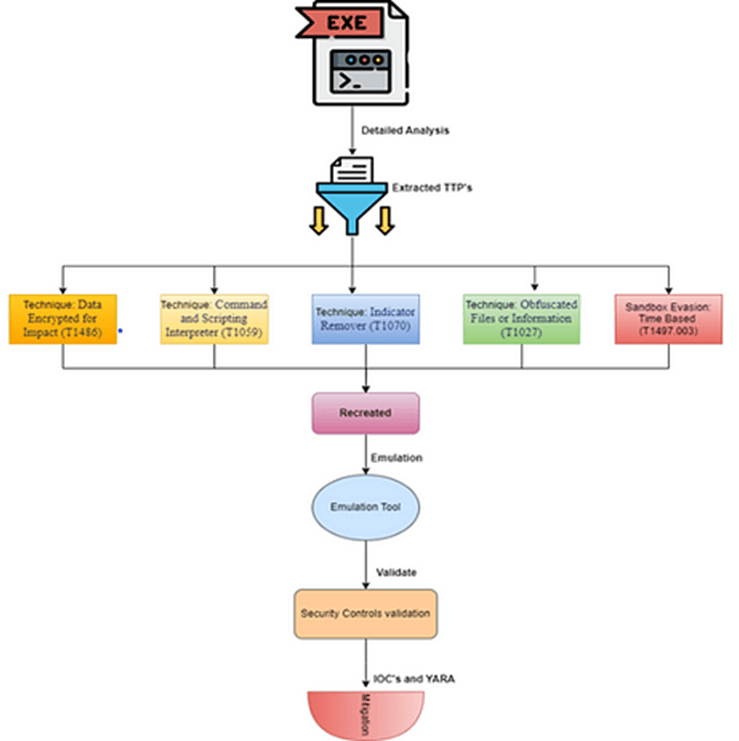
As an offensive security researcher, my primary responsibility involves the meticulous analysis of real-world samples to extract Tactics, Techniques, and Procedures (TTPs). Once identified, I map these TTPs onto the MITRE ATT&CK framework, providing a comprehensive understanding of the adversary’s behavior. To validate the effectiveness of security controls, I employ emulation techniques by recreating the identified TTPs using the same methods observed in the analyzed samples. This emulation process ensures a realistic simulation of the adversary’s actions, allowing for thorough validation of existing security measures. For this purpose, I leverage proprietary emulation tools, ensuring precision and adaptability in replicating sophisticated attack scenarios. My role extends beyond the typical scope of a Security Operations Center (SOC) Level 3, as I not only analyze but also recreate the same behavior for proactive emulation and then provide mitigation strategies, including the development of YARA rules, Sigma detection signatures, and Indicators of Compromise (IoC). This comprehensive approach is crucial for enhancing the organization’s resilience against evolving cyber threats.
This is the overall flow of my work:
Mitigation
YARA
Conclusion
Traditional signature-based detection methods often struggle to identify this polymorphic malware due to its rapid ability to change and evade detection.
This analysis underscores the pressing need for behavioral detection mechanisms in modern cybersecurity strategies. Behavioral detection, powered by machine learning and artificial intelligence, focuses on identifying behavioral patterns rather than relying solely on known signatures. This approach enables security systems to adapt and recognize emerging threats like AsyncRAT, even as they evolve to evade traditional defenses. By continuously monitoring and analyzing system behavior, security solutions equipped with behavioral detection offer a proactive defense, providing a crucial layer of protection against emerging threats that traditional methods may miss.