
PEB Walk:
Avoid API calls inspection in IAT by analyst and bypass static detection of AV/EDR
In this blog, we discuss the different approaches of AV/EDRs static analysis and detection. Legacy antivirus software was dependent on signature-based de...

Summary
In this blog, we discuss the different approaches of AV/EDRs static analysis and detection. Legacy antivirus software was dependent on signature-based detection. They calculate the hash of binary and see if this specific signature matches with known malware signature in the database than marks the binary malicious or benign accordingly. To bypass hash-based detection procedure is very simple. You just need to change even a single byte to bypass hash-based detection. But now AVs are quite advance they don’t only rely on known malware hashes, also nowadays EDRs comes into play which looks for patterns, IAT imports, EDR solutions use pattern matching to identify suspicious code sequences, strings, or structures within files that are commonly associated with malware. EDR tools utilize YARA rules to detect malware based on specific patterns and characteristics defined in the rules. These rules can identify both known and unknown threats by looking for indicators of compromise (IOCs). EDR solutions analyze file attributes and behaviors for characteristics typical of malware. This includes examining file entropy, uncommon API calls, suspicious import tables, and other anomalous features. We use different techniques to bypass static analysis of EDRs solutions. We divide our arsenal preparation into 4 main stages, we try to hide strings, API imports by obfuscating them, resolve API using different ways such as dynamically walking the process environment block (PEB) and resolve export functions by parsing kernel32.dll in-memory to hide imports. In the end, we look at the results of the detection rate after applying different techniques and see which technique is more effective to fly under the radar of EDRs static detection.
PEB Structure
The Process Environment Block (PEB) is a crucial data structure in Windows operating systems that contains information about the state of a process. It’s an undocumented structure in the Windows API but is well-known among malware analysts and developers for its rich set of information about a process.
From the structure members mentioned above, we can see the highlighted Ldr member. This member contains a pointer to a PEB_LDR_DATA structure, which holds information about all the loaded modules (EXEs/DLLs) in the current process. Within this structure, the InMemoryOrderModuleList is a doubly linked list used to find the addresses of loaded DLLs.
In this structure, a process would use the InMemoryOrderModuleList to enumerate loaded modules. This linked list contains entries for each module, represented by LDR_DATA_TABLE_ENTRY structures, which provide detailed information about each module.
PEB Walk Overview
PEB walk is the process of accessing the PEB structure form process space and enumerating all loaded modules in space of process dynamically. After enumerating the loaded modules, resolve the functions and variables of the modules and use them into code.
X86 Assembly:
mov eax, fs:[30h] ; EAX now points to the PEB
X64 Assembly:
mov rax, gs:[60h] ; RAX now points to the PEB
To outline the process, the PEB walk for resolving the addresses of LoadLibraryA and GetProcAddress is as follows:
Obtain and access the PEB structure of the current process.
Navigate to the PEB_LDR_DATA structure using the Ldr member of the PEB.
Iterate through the InLoadOrderModuleList to locate the LDR_DATA_TABLE_ENTRY for kernel32.dll.
Once the entry for kernel32.dll is found, extract its base address.
Manually parse the export table of kernel32.dll to resolve the addresses of LoadLibraryA and GetProcAddress.
Arsenal preparation and Stages
We use a simple process injection technique, which is using Windows APIs such as VirtualAllocEx, WriteProcessMemory, and CreateRemoteThread to inject a msfvenom generated shellcode into a process.
• VirtualAllocEx: To allocate RWX (Read-Write-Execute) memory region into the remote process.
• WriteProcessMemory: To write shellcode into the allocated memory section.
• CreateRemoteThread: To create a new thread that executes the shellcode when it starts.
Stage 1 (Simple Injection)
In stage 1, we write a simple process injection technique, which is using the above-mentioned APIs to inject a malicious shellcode into a remote process. However, in the first stage, we directly use these APIs in our arsenal instead of dynamically resolving the APIs.
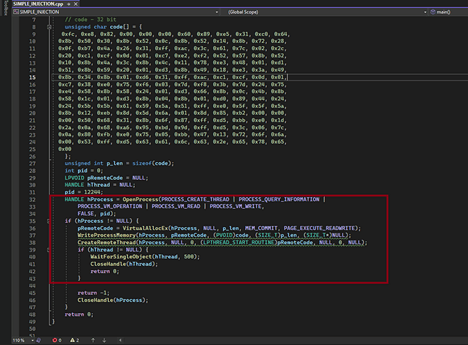
Simple Injection
In the above code, we use OpenProcess API to get the handle of process, and we allocate RWX memory region, write shellcode which is opening calc.exe and creating new thread to execute our shellcode into remote process. This is a very simple and straightforward code.
IAT Inspection
In each stage, we do IAT inspection by using three PE editor tools PE Bear, CFF Explorer, and PE studio. Let’s inspect our compiled binary with these tools and see what the indicators on which our malware can be detected are and try to overcome them in the coming stages.
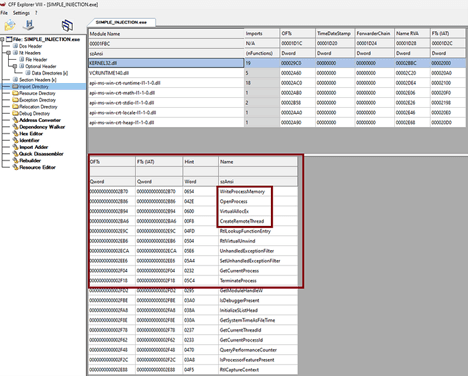
CFF Explorer Results
You can clearly see the API calls in the IAT table of compiled binary, and by looking into these calls, malware analysts can clearly indicate that this binary is doing shellcode injection. These are the very well-known sequences of API calls to perform injection. On the other side, EDRs can detect the binary in static analysis because they do inspection on IAT.
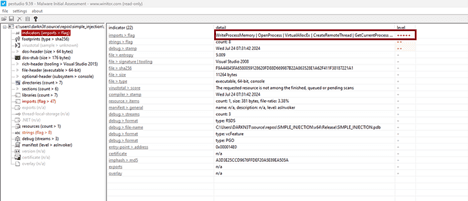
PE Studio Results
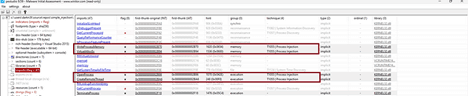
PE Studio
You see, PE studio flagged these APIs as malicious. It is the beauty of PE studio that it mapped flag API calls on the MITRE ATT&CK framework. So, according to PE Studio, this malware is performing process injection, which is very right in this case. So, we have to overcome these challenges in our next stages of arsenal preparation.
Execution
In each stage, we execute binary to verify the working of the malware. Every time malware injects malicious shellcode into remote processes and executes calc.exe. In this stage, we use Windows API calls directly into code.
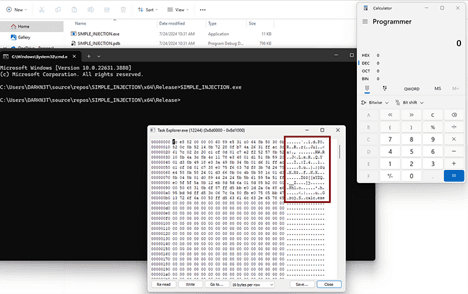
Stage 1 Execution
Stage 2 (DynamicAPI Injection)
In stage 2, we use the same injection technique to inject malicious shellcode into the process, but this time, we resolve windows APIs dynamically by using two main functions GetProcAddress and LoadLibraryA.
GetProcAddress: This function resolves the address of any function inside the given module. It takes two arguments — the module from which to retrieve the function address and the function name to be resolved.
LoadLibraryA: This function retrieves the handle of the module from which we want to get the function address. In this case, the module is kernel32.dll.

Prototypes
In this stage, first, we have to define the prototypes of each API that we want to resolve dynamically. We define a type representing a function pointer.
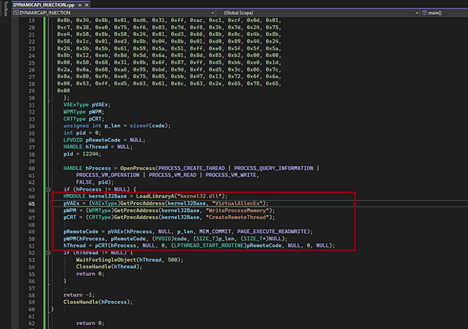
DynamicAPI Injection
The above code explains that we use the LoadLibrayA function to get the handle of kernel32.dll, and then we use GetProcAddress to resolve our APIs inside the kernel32.dll Now, this time, we use dynamic API resolution technique and see what makes better in our compiled binary.
IAT Inspection
In each stage, we do IAT inspection by using three PE editor tools PE Bear, CFF Explorer, and PE studio. Let’s inspect our compiled binary with these tools and see what the indicators on which our malware can be detected are and try to overcome them in the coming stages.
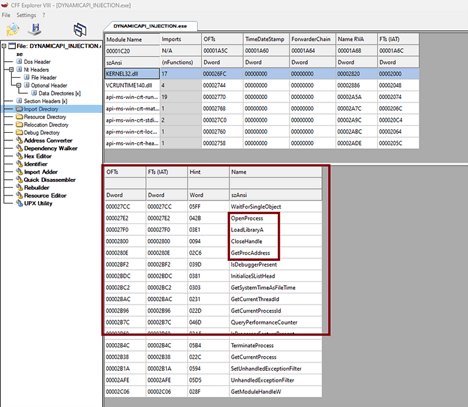
CFF Explorer Results
You can clearly see, at this stage we are quite better because this time we have fewer imports which indicate the behavior of malware. But still, we see some indicators such as LoadLibrarayA and GetProcAddress, which can be detected in static analysis. We try to overcome this issue in our next stage preparation.
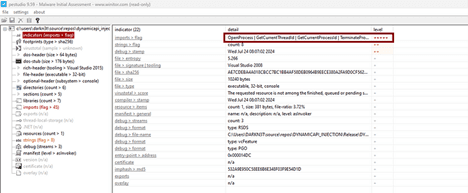
PE Studio
PE studio still flagged some APIs and mapped them on MITRE ATT&CK under the category of process injection.
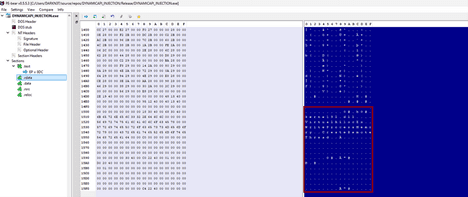
PE Bear Results
Oops, we see there are some strings in this stage under .rdata section of PE file. These strings are a great indicator of the behavior of binary. Malware can still be detected in static analysis by EDRs. We must overcome this issue in our coming stages.
Execution
In each stage, we execute binary to verify the working of the malware. Every time malware injects malicious shellcode into remote processes and executes calc.exe. In this stage, we use dynamic resolution of Windows API calls to inject shellcode.
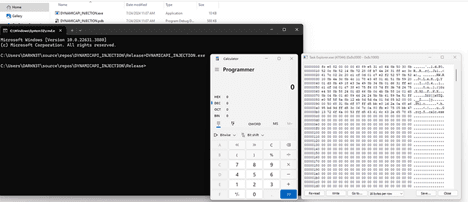
Stage 2 Execution
Stage 3 (PEB walk Injection)
In stage 3, we use the same injection technique to inject a malicious shellcode into the process, but this time, we use a PEB walk to resolve APIs dynamically. We access the PEB and enumerate all loaded modules in process space and find the base address of kernel32.dll. We use the base address of kernel32.dll to resolve the APIs’ function address and perform process injection using PEB walk.
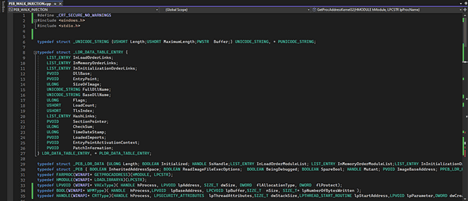
PEB Structures
In this stage, first, we have to define all the structures needed to perform a PEB walk. You can find these structures on Microsoft documentation.
PEB (winternl.h) — Win32 apps
Contains process information.learn.microsoft.com
We define all the needed structures, and we define function pointer types for the Windows API functions we need.
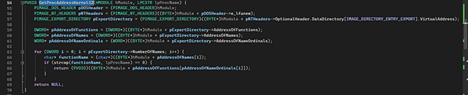
Resolve Function Address
Above code parse kernel32.dll as PE file because DLL is PE file format and first it is getting the DOS header and by using DOS header member e_lfanew which is 4 bytes field tells the offset of NT header. Now, the NT header contains option header, which holds the data directory field, including all exported functions of the module. So, this function returns the address of the matched function name.
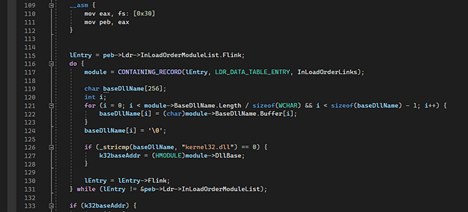
PE Access and Walk
This code snippet accesses the PEB and then traverses the InLoadOrderModuleList to find the LDR_DATA_TABLE_ENTRY for kernel32.dll.
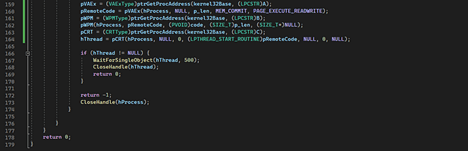
Resolve API functions
Finally, we resolve and use the APIs to perform process injection.
IAT Inspection
In each stage, we do IAT inspection by using three PE editor tools PE Bear, CFF Explorer, and PE studio. Let’s inspect our compiled binary with these tools and see what the indicators on which our malware can be detected are and try to overcome them in the coming stages.
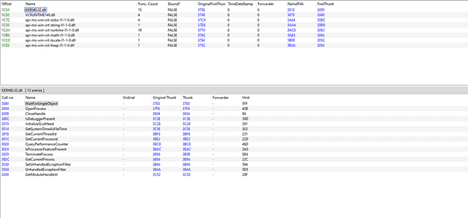
CFF Explorer Results
Great, in this stage, we improve our IAT, and this time, we can see there is no malicious import, which can give indicators for malicious behavior. We see there is no GetProcAddress and LoadLibraryA functions this time. This is a good sign for a malware developer because this can bypass static analysis of EDRs solutions.
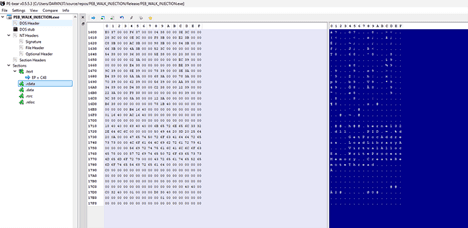
Malicious String
Oops, we see there are still some strings in this stage under .rdata section of PE file. These strings are a great indicator of the behavior of binary. Malware can still be detected in static analysis by EDRs. We overcame one issue, which was IAT imports indication, but this issue could be addressed in our coming stage.
Execution
In each stage, we execute binary to verify the working of the malware. Every time malware injects malicious shellcode into remote processes and executes calc.exe. In this stage, we use the dynamic resolution of Windows APIs by PEB walk to inject shellcode.
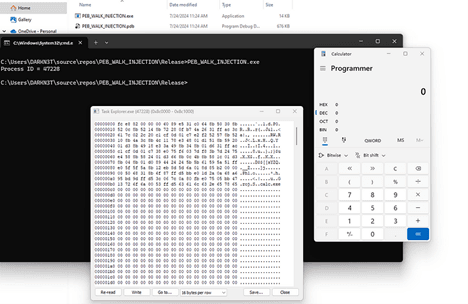
Stage 3 Execution
Stage 4 (PEB Walk and API Imports Obfuscation, Strings Hide)
In stage 4, we use the same technique to inject a malicious shellcode into the process. But this is the final stage, so we have to overcome all the challenges we faced in the previous stage. We need to hide malicious strings and dynamically resolve APIs.
PEB Structures
In this stage, first, we have to define all the structures needed to perform a PEB walk, same as stage 3. You can find these structures on Microsoft documentation.
PEB (winternl.h) — Win32 apps
Contains process information.learn.microsoft.com
We define all the needed structures, and we define function pointer types for the Windows API functions we need.
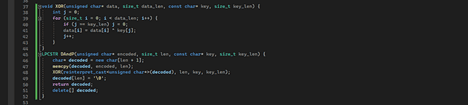
XORing
In this stage, we use xor encryption to obfuscate the API calls and hide the strings to bypass static analysis. This function will use the key “offensivepanda” and decrypt all API calls at runtime, which are encrypted and stored inside the code.
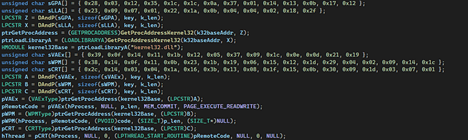
Decrypt and Inject
You can see in this code snippet that we decrypt the APIs’ calls and pass it to function, which is resolving the address of API calls dynamically, All the API calls are encrypted.
IAT Inspection
In each stage, we do IAT inspection by using three PE editor tools PE Bear, CFF Explorer, and PE studio. Let’s inspect our final stage compiled binary with these tools and see if we have overcome all the issues or not.
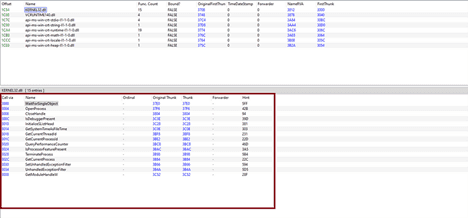
CFF Explorer Results
Great, in this stage, we improve our IAT, and this time, we can see there is no malicious import, which can give indicators for malicious behavior. We see there is no GetProcAddress and LoadLibraryA functions this time.
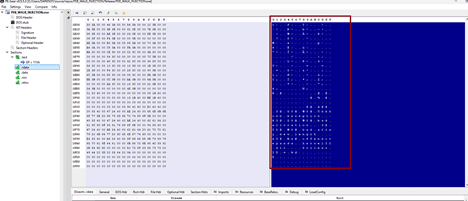
Strings Stage Final
Great, there is no malicious string this time because we obfuscate all API calls in our code, and we don’t have any string and API import, which indicates the behavior of malware in static analysis.
Execution
In each stage, we execute binary to verify the working of the malware. Every time malware injects malicious shellcode into remote processes and executes calc.exe. In this stage, we use dynamic resolution of Windows APIs by PEB walk and obfuscate API call to inject shellcode.
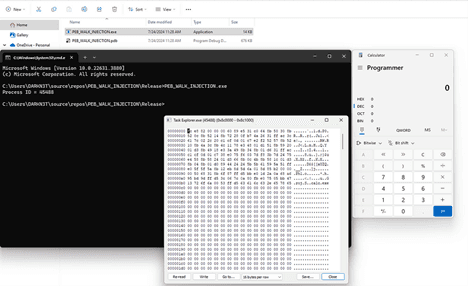
Stage 4 Execution
Detection Results
We removed the msfvenom shellcode from the code and uploaded first and last stage malware on virustotal to see the detection results. We remove shellcode because the msfvenom generated shellcode is highly detectable, so we want to see the effectiveness of other techniques we used in this post. We know virustotal check the behavior as well, but let’s see the results.
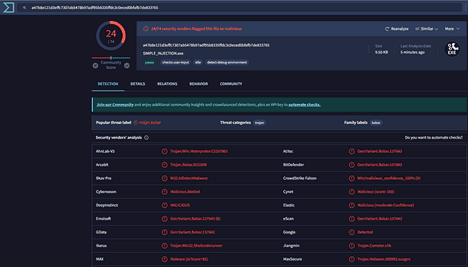
Stage 1 Results (Simple Injection)
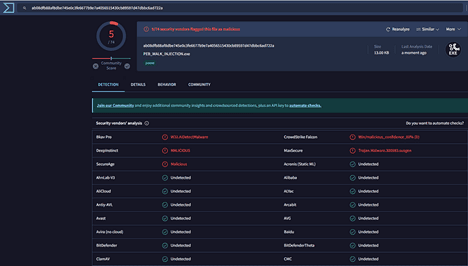
Final Stage Result (PEB walk and Xor)
Note
These techniques help to bypass static analysis of EDRs solution and also help to make malware harder in static analysis so analysts can’t simply understand the behavior of malware by looking into IAT and strings. But binary can still be detected in dynamic and behavior-based analysis. Because dynamic bypass was not the scope of this post, but you can see our previous blogs, which mainly focused on dynamic behavior bypass.