
Incident response report —
REMCOS Rat
Incident response report — REMCOS RatRemcos RAT is a commercially available Remote Access Tool (RAT) marketed for legitimate use in surveillance and penetration...
Remcos RAT is a commercially available Remote Access Tool (RAT) marketed for legitimate use in surveillance and penetration testing. However, it has been leveraged in various unauthorized hacking initiatives.
Executive Summary
The analyzed exploit demonstrates advanced capabilities, including TLS-encrypted communication, clipboard monitoring, Windows Registry modifications for persistence, and comprehensive logging of its activities in a “logs.dat” file. Additionally, it employs memory injection techniques, enhancing its potential to compromise the targeted system. Further investigation is recommended to fully understand its malicious actions and mitigate potential security risks.
Detection
The following steps will help in detection of the provided sample “Remcos 4.9.2 pro RAT”:
• Identify if the folder exists in the system:
◦ C:\ProgramData\remcos
◦ And the file in the above folder with name:
▪ C:\ProgramData\remcos\logs.dat
• Check if persistence exists in the system:
◦ Check a task in Task Scheduler with name Nano
◦ Check folder exists in system:
▪ C:\Users\%username%\AppData\Roaming\AppData
◦ Check if folder contains a copy of dropper with name:
▪ C:\Users\%username%\AppData\Roaming\AppData\AppData.exe
• Check if registry exists in the system (Note: * means characters are random):
◦ Computer\HKEY_CURRENT_USER\SOFTWARE\Rmc-******
◦ This registry contains 3 keys:
▪ licence
▪ exepath
▪ time
• Network communication on:
◦ svdjvhinvosdhfojsdfdffhdoflsnj.con-ip.com:1997
◦ geoplugin.net/json.gp:443
• Network communication by infected process:
◦ csc.exe (injection in legitimate binary)
◦ C:\Windows\Microsoft.NET\Framework\v4.0.30319\csc.exe (Framework version could be different)
Remediation
The following steps will help to remediate the provided sample “Remcos 4.9.2 pro RAT”.
Follow these steps in order:
• Remove persistence:
◦ Delete task from Task Scheduler with name Nano
◦ Delete folder from path:
▪ C:\Users\%username%\AppData\Roaming\AppData
• Remove malicious code from memory:
◦ Because shellcode injection technique writes malicious code in volatile memory of csc.exe, it is not a permanent infection.
◦ Restart the csc.exe process to remove the infection after removing persistence.
• Remove registries:
◦ Computer\HKEY_CURRENT_USER\SOFTWARE\Rmc-******
• Block domains:
◦ svdjvhinvosdhfojsdfdffhdoflsnj.con-ip.com:1997
◦ geoplugin.net/json.gp:443
• Resume operation
Malware Composition
Malwares perform some operation with the csc.exe
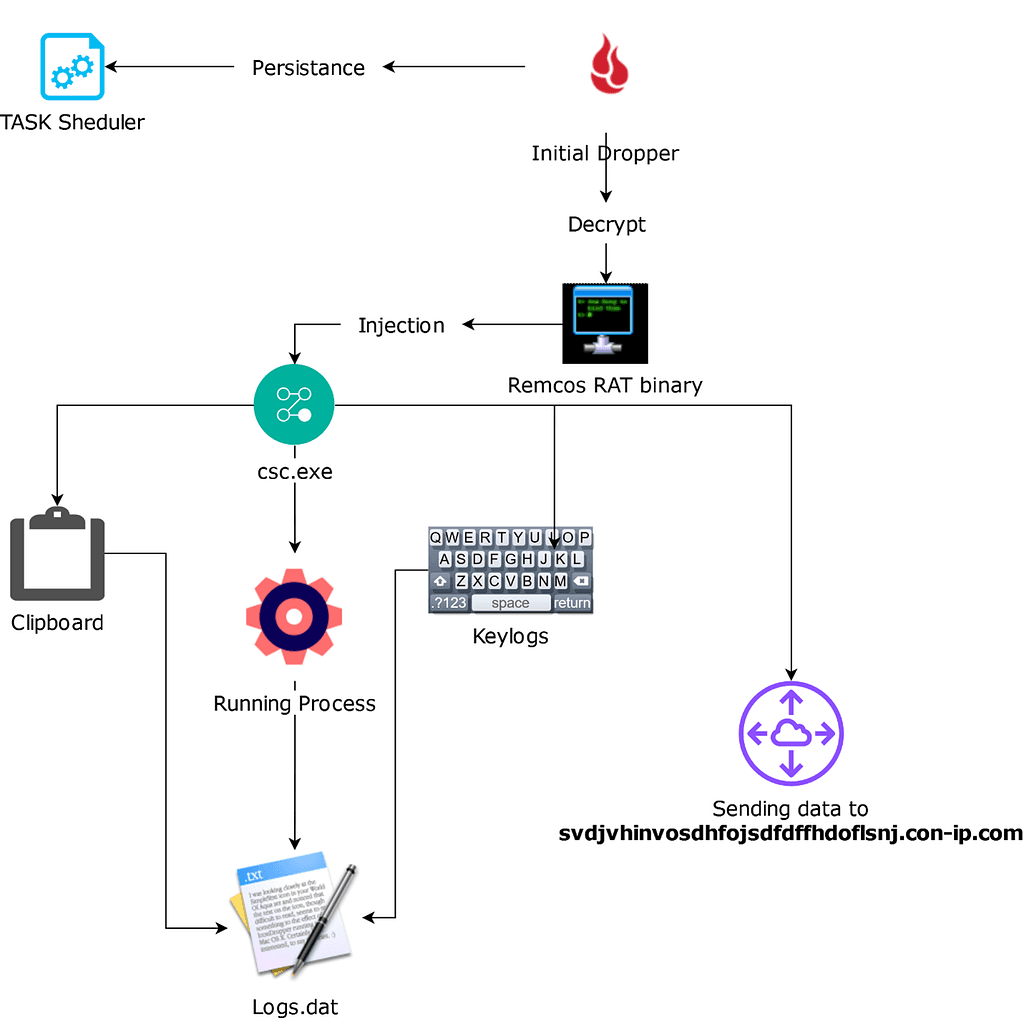
Fileless Execution: Malware use csc.exe for fileless execution. This can make it more difficult to detect since there’s no traditional executable file to analyze.
Injecting Code: Malware can inject its code into the csc.exe process or use csc.exe as a launching point for further attacks. By injecting code, malware can potentially gain access to sensitive system resources or perform other malicious actions.
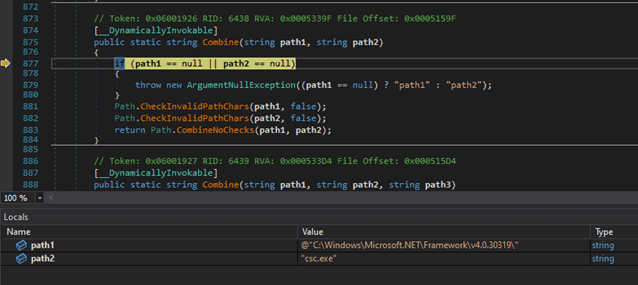
Dynamically importing APIs using LoadLibraryA and GetProcAddress is a technique often used in malware to obfuscate and evade detection. By encoding the API names as base64 strings, the malware can make it more difficult for security tools to identify and analyze its behavior.
APIs are being imported dynamically using LoadLibraryA and GetProcAddress. All these are base64 encoded strings.
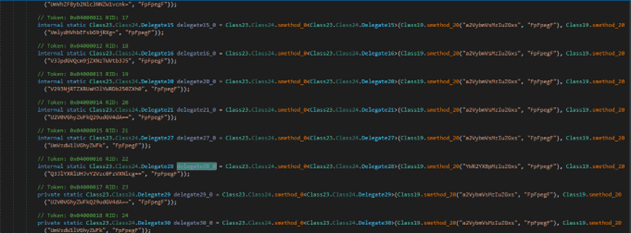
It creates a process named “csc.exe” from system32 with the same privileges as itself. The API being used is called CreateProcessAsUser. In the screenshot below, process trees are being shown:

It starts the process csc.exe in a suspended state and likely to inject its shellcode in that process.


The malware then follows with a sequence of APIs for the Process Injection:
At this stage, the exploit is actively writing shellcode into the memory space of the csc.exe process, thereby paving the way for the goal of executing the exploit without any traceable files on the system.
This step marks a critical phase in the exploit’s execution, where it strategically deposits shellcode into the volatile memory of csc.exe, enabling the exploitation to progress stealthily, evading traditional file-based detection mechanisms.
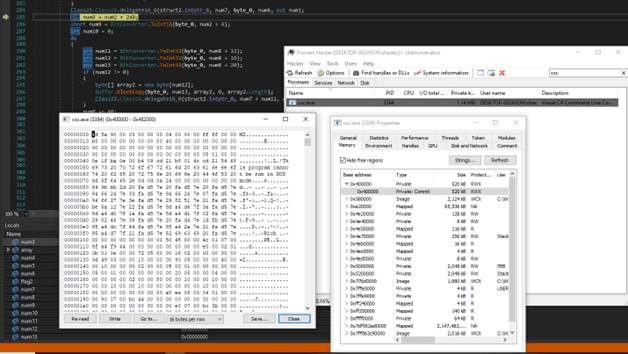
After the thread has been resumed, csc.exe proceeds to execute various malicious operations, which include establishing connections with malicious IP addresses, logging sensitive data, and making alterations to system registries.
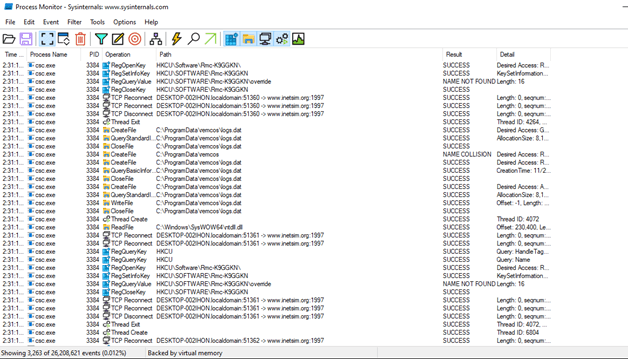
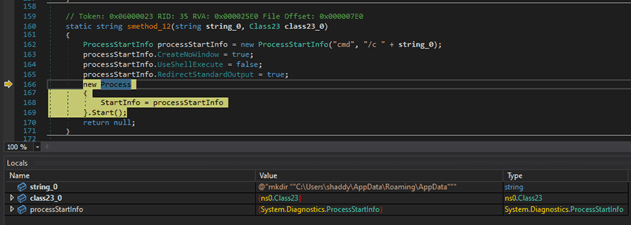
After injection, the initial dropper makes a directory in AppData/Roaming with the name of AppData.
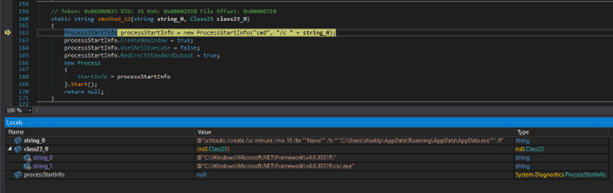
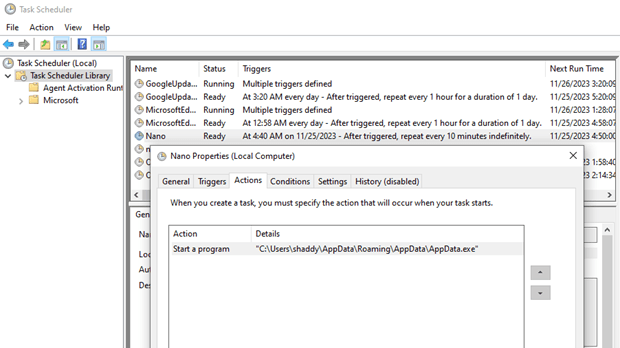
Following that, the malicious software establishes persistence through task scheduling. It runs the following command to achieve this:
@”schtasks /create /sc minute /mo 10 /tn “”Nano”” /tr “”’C:\Users\shaddy\AppData\Roaming\AppData\AppData.exe’”” /f”
This command is initiated through the command prompt (cmd) and creates a scheduled task named “Nano” in the Windows Task Scheduler. This task is configured to execute the malware binary, located within the AppData path, every 10 minutes. This persistence mechanism ensures that the malicious code remains active and continues to execute periodically, making it more challenging to detect and eradicate.
Here is the proof of task scheduling in task scheduler.
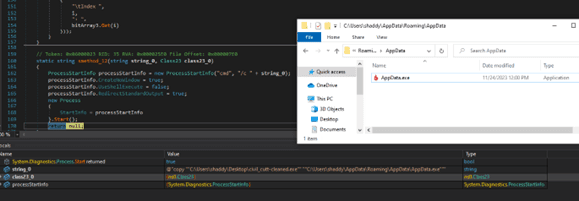
After persistence, it just copies itself in the path where is added persistence. The full command is as follows:
@”copy “”C:\Users\shaddy\Desktop\civil_cutt-cleaned.exe”” “”C:\Users\shaddy\AppData\Roaming\AppData\AppData.exe”””
SECOND STAGE: INJECTED CODE
Infected file: csc.exe
Injected shellcode: Remcos RAT
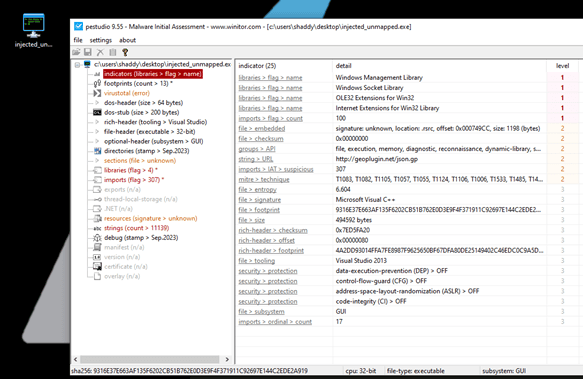
This is indeed an original instance of the Remcos RAT generated through the “breakingsecurity” company agent. Furthermore, its identity as a Remcos RAT is evident from its logo.
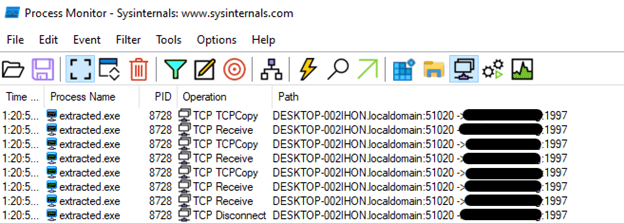
After examining the final binary, it was discovered that it was connecting to a remote server with the address {svdjvhinvosdhfojsdfdffhdoflsnj.con-ip.com} on port {1997}, as shown in the screenshot. This suggests that the binary was actively communicating with a remote server, likely for malicious purposes, such as sending or receiving data or instructions from a remote source.
In our assembly-level analysis, we discovered that this Remote Access Trojan (RAT) was utilizing Transport Layer Security (TLS) for its communication with the server. Due to the use of TLS, the communication between the victim’s PC and the attacker’s server was fully encrypted. As illustrated in the screenshot, we were unable to intercept and decipher the content of the traffic, as all data exchanged between the two parties was concealed by encryption.
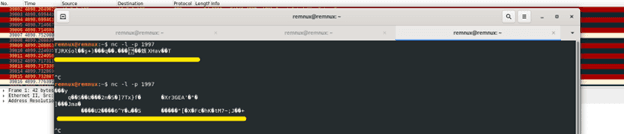
Initially, the exploit operated with TLS encryption, preventing us from inspecting the transmitted data. However, we successfully patched the instructions, as shown in the provided screenshot, enabling us to intercept unencrypted plaintext data. The exploit was then set up to transmit data to the server at {svdjvhinvosdhfojsdfdffhdoflsnj.con-ip.com} on port {1997}. This alteration allowed us to monitor the content of the communication between the victim system and the remote server.
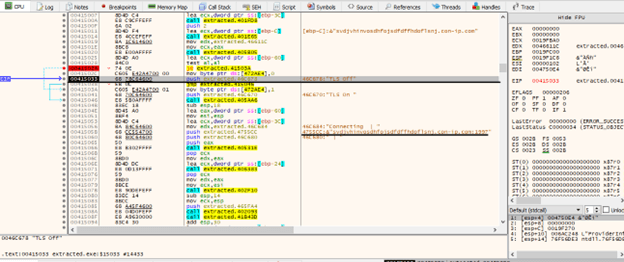
By disabling TLS, we gained visibility into the specific data from the system that was being sent to the server. This removal of encryption provided a clearer view of each request made by the exploit to the server, allowing for more transparent analysis of the data being transmitted.
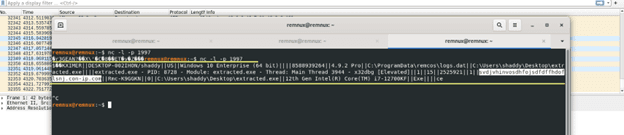
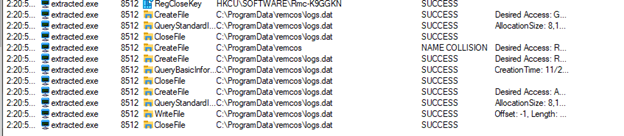
This exploit is also playing with logs.dat file for some reason.

In the assembly-level analysis, it was revealed that the exploit is engaged in the following sequence of actions:
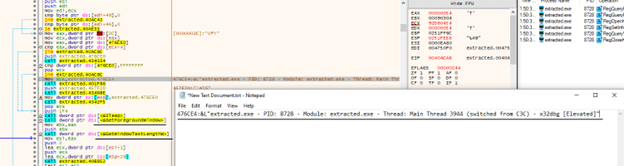
First, it checks if the user has copied any text.
If text has been copied, it saves this text in a register.
Subsequently, it proceeds to save all the data, including the copied text, into a file located at: C:\ProgramData\logs.dat
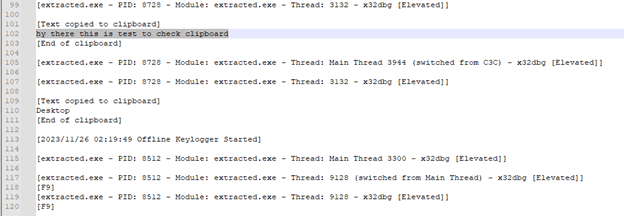
This behavior suggests that the exploit is monitoring and logging the user’s clipboard activity, capturing any text that has been copied to the clipboard, and then persistently storing this data in the specified logs.dat file within the ProgramData directory. This type of activity is often associated with information gathering or surveillance capabilities in malicious software.

Let’s test if the clipboard is working in the system or not in a more efficient way. We copied this text for a test to see what will happen.
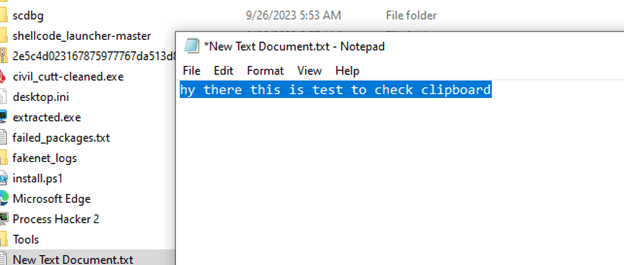
It’s important to monitor the behavior of the exploit after storing the clipboard data in the EBX register, as this data may be used for various purposes, potentially including logging or exfiltration. The next steps in the analysis will help uncover how this data is further manipulated or utilized by the exploit.

After that it gets current process which are running information
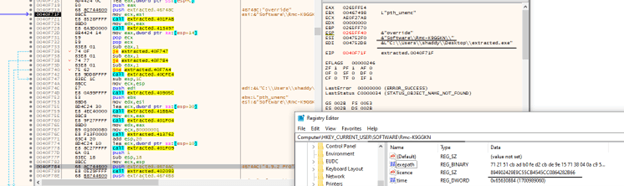
The exploit’s next step involves adding its presence to the Windows Registry. Specifically, it appears to be making registry modifications by adding the following information:
Executable Path: The exploit is adding the path to its own executable file to the Windows Registry. This allows it to be executed automatically when the system starts up.
“License”: The term “license” in this context might be used as a label or identifier within the registry. It’s not clear whether it’s actually related to licensing in a legitimate sense.
Thread Execution Time: The exploit is also recording information related to thread execution time in the registry. This could be used for scheduling or tracking its own activities.
Following the registry modifications, it appears that the exploit proceeds to save all the collected data, which may include clipboard contents and other information, into a file named “logs.data.”
Analyzing the content of these logs can provide valuable insights into the exploit’s behavior and potentially help in understanding its objectives and impact on the compromised system.
Network Indicators
YARA Rules
Following is the Yara rule for initial dropper.